
What is a Workspace Template?
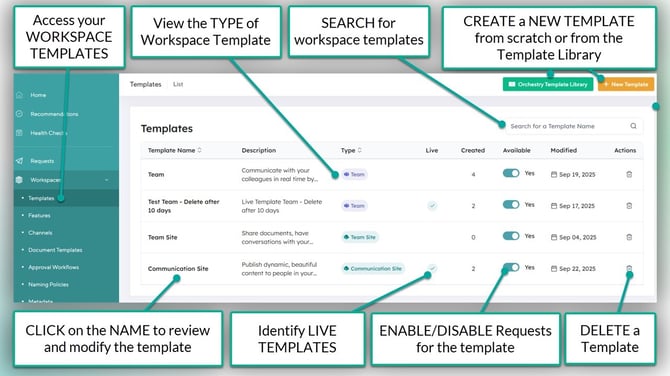
Workspace Templates are the heart of Orchestry's Provisioning engine, allowing businesses to provide their users with Teams, SharePoint sites and Viva Engage communities customized to the various use-cases of the business.
Workspace Templates Types
Each workspace template must be configured to a TEMPLATE TYPE. When creating a new template, the default choice is a Microsoft Teams workspace, but you can change the property to any available type.
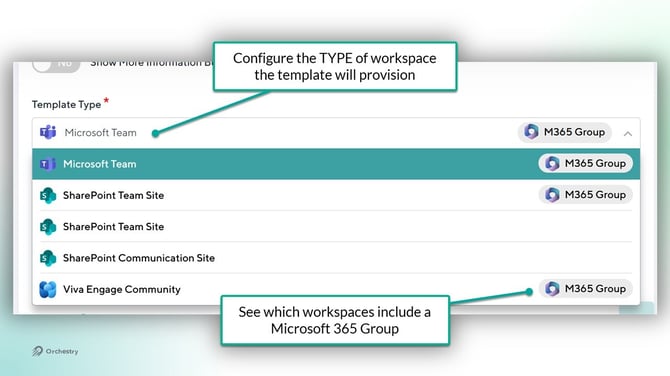
The table below lists the TYPES of workspace templates you can create in Orchestry:
| WORKSPACE TEMPLATE TYPE | HAS M365 GROUP |
| Microsoft Teams | Yes |
| SharePoint Team Site | Yes |
| SharePoint Team Site | No |
| SharePoint Communication Site | No |
| Viva Engage Community | Yes |
How to Create Workspace Templates
Orchestry admins can design custom workspace templates to serve different areas of the business, whether for departments, project teams, classes or another group - you can create a workspace template designed for their needs.
To Create a Workspace Template:
- Go to the Templates page
- Click NEW TEMPLATE
- Complete all required fields on the 'Details' tab (Name, description, type, and thumbnail)
- Setup (or disable) the LIVE TEMPLATE tab
- Complete all required fields on the 'Configuration' tab (Default Permission Type)
- SAVE your changes
There is more that goes into designing a workspace template to ensure it meets your governance, security and end-user requirements. Workspace templates also support:
- Orchestry policies (Archival, Workspace Review, Guest Request, etc.)
- Container-Level Sensitivity labels
- Naming policies
- Approval policies
- Orchestry metadata
- and much more!
Want to learn how to setup a Workspace Template?
Check out the article: How to Configure a Workspace Template
What Are Live Templates?
A "Live Template" is the combination of a Microsoft 365 workspace (i.e.: a SharePoint site) and an Orchestry workspace template. This configuration will enable you to provide greater levels of customization to provisioned workspaces, including custom team channels, site pages and more.
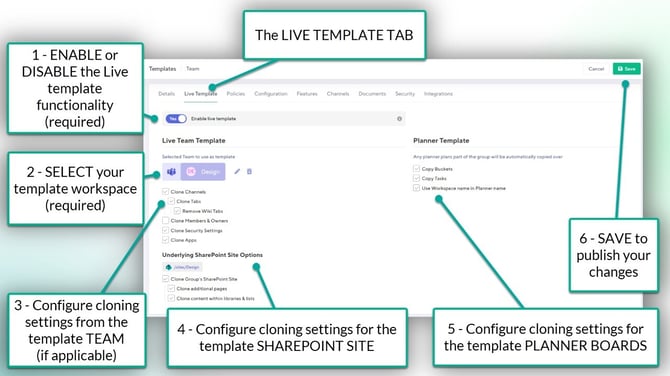
Workspaces that do NOT use the Live Template functionality are referred to as 'Static templates'.
What is Orchestry Metadata?
Orchestry Metadata are properties that you can create in Orchestry and apply to your workspaces.
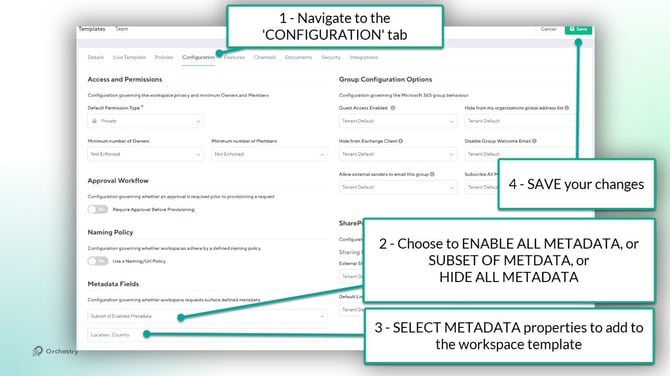
Applying metadata can help:
- Collect key information about a workspace from requestors (workspace owners)
- Apply helpful naming policies to your workspaces
- Filter for workspaces in the Orchestry Directory
- Trigger custom workflows via the Orchestry Provisioning API
Want to learn about Orchestry Metadata?
Check out the Article: Metadata Overview Overview
What are Approval Workflows?
You can use Approval Workflows to ensure workspace requests are reviewed by a team member before provisioning actually starts. This can help reduce workspace sprawl, while also helping ensure that end users are requesting the appropriate workspace for their needs.
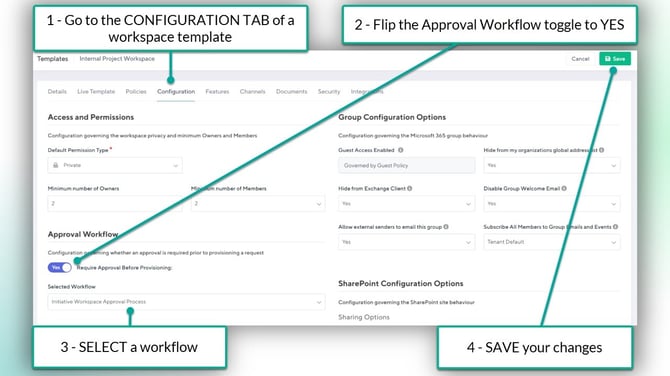
Want to learn about Approval Workflows?
Check out the article: Approval Workflows Overview
Channels for Microsoft Teams Workspaces
You can configure Microsoft Teams workspace templates to include a set of STANDARD and/or PRIVATE channels from a library maintained on the 'Channels' page in Orchestry
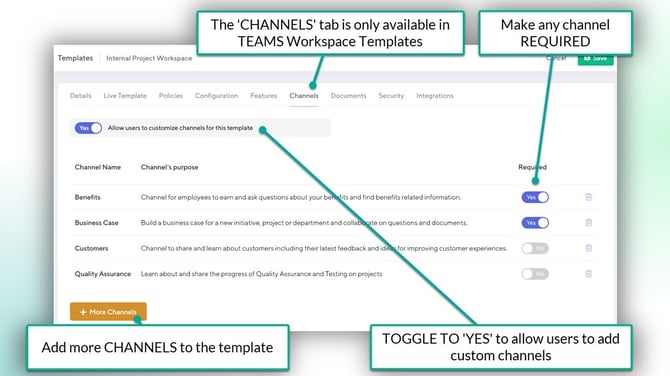
Channels are most effective for STATIC templates. You can include REQUIRED channels, SUGGESTED channels and/or allow users to add their own channels during a workspace request.
Want to learn about Channels for Teams Workspace Templates?
Check out the article: Channels Overview
Document Templates for Workspace Templates
You can include document templates with your provisioned workspaces by uploading them to the 'Document Templates' page in Orchestry and then applying them to workspace templates (Document tab).
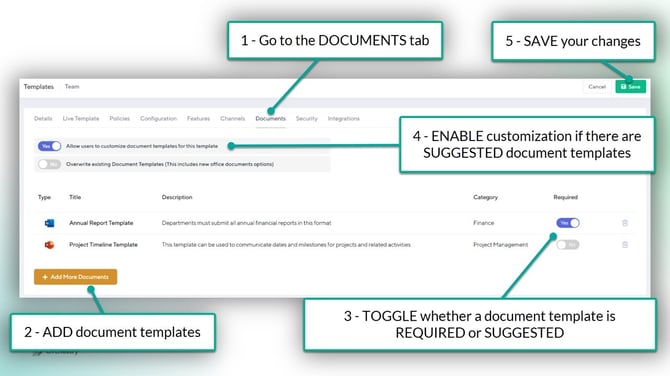
Document Templates are most effective for STATIC workspace templates. Orchestry supports any document type that is supported by SharePoint Online, including standard Office file types (.DOCX, .XLSX, .PPTX, etc.), PDFs, images, etc.
Want to learn how to configure document templates to your workspace templates?
Check out the article: Document Templates Overview
Features for Workspace Templates
Features are PNP packages that you can apply to the HOME page of your provisioned SharePoint sites. You can create and upload your own features into Orchestry and associate them with workspace templates.
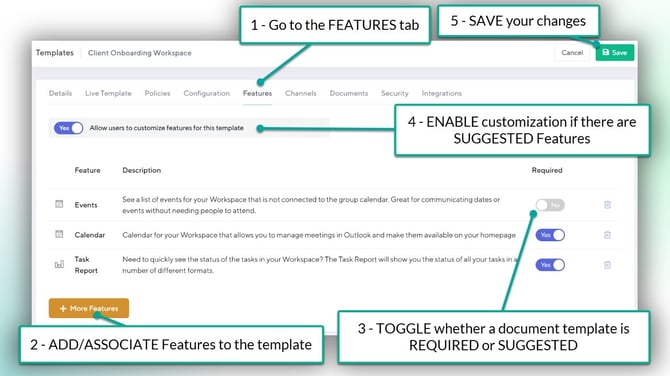
NOTE: Orchestry is unable to provide support on the development of maintenance of your custom features.
Want to learn more how to configure custom Features in your workspace templates?
Check out the article: Features Overview