
What Are Workspace Reviews?
Workspace Reviews are a type of workspace policy that help:
- Recover tenant storage by cleaning up SharePoint document library version history
- Ensure M365 Group membership is current with regular reviews of existing membership
- Enable workspace owners to ensure their workspaces are current and compliant
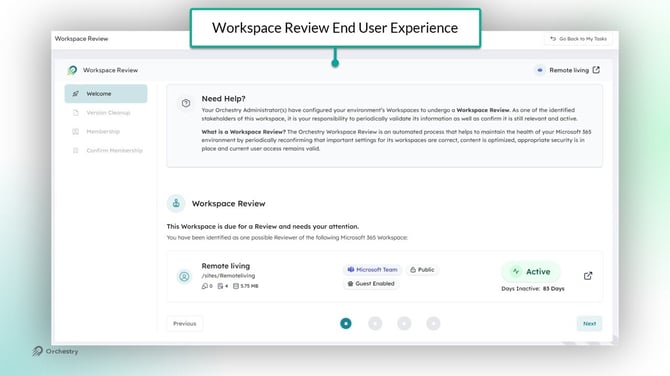
How Do I Start a New Workspace Review Policy?
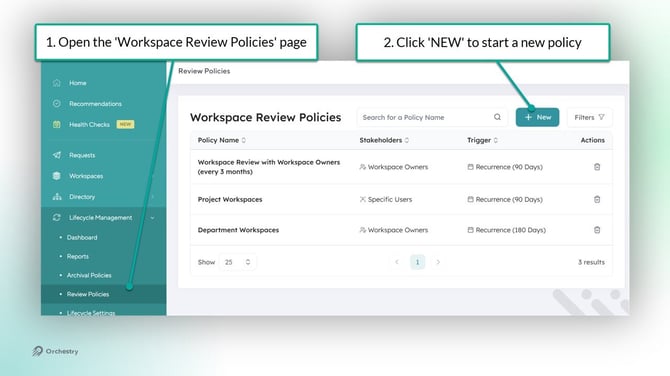
New workspace review policies can be created and managed from the 'Workspace Review Policies' page (Lifecycle Management > Review Policies).
To create a new policy:
- As an Orchestry admin, go to the 'Workspace Review Policies' page (https://app.orchestry.com/lifecycle/policies/workspacereview)
- Click the NEW button to start a new policy
Want to learn how to configure your first Workspace Review Policy?
Check out the article: How to Create a Workspace Review Policy
How Do I Complete a Workspace Review?
When a Workspace Review is triggered, the workspace owner (or delegate users) will be assigned a task in Orchestry.
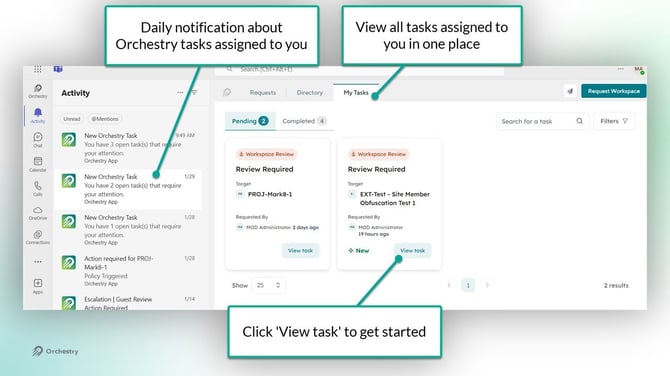
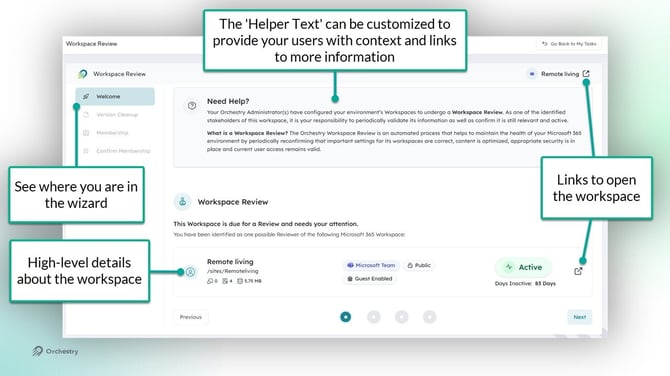
By clicking "View Task", Orchestry will launch the wizard to guide users through each step of the review.
Want to learn more about completing workspace reviews?
Check out the article: Completing a Workspace Policy
Questions & Answers on Workspace Review Policies
What Types of Workspaces Support Workspace Review Policies?
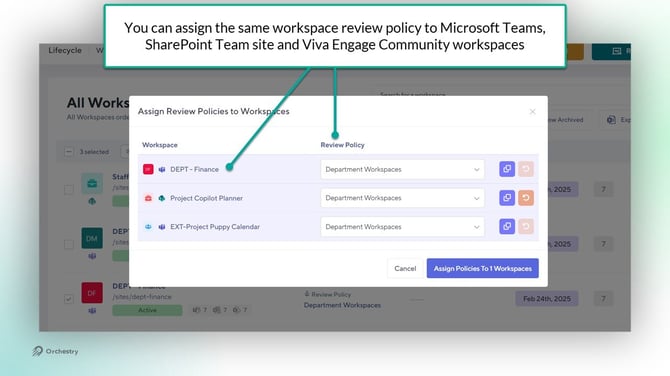
Workspace Review policies can be assigned to any workspace that use Microsoft 365 Groups, including Microsoft Teams, SharePoint Team Sites and Viva Engage Communities.
| Workspace Type | Supported? |
| Microsoft Teams | yes |
| SharePoint Team Sites | yes |
| SharePoint Communication Sites | no |
| Viva Engage Communities | yes |
Can I Add or Remove Guest Users When Completing a Workspace Review?
No, reviewers can only add/remove internal users only. You can continue to leverage your existing Guest Request policies to manage guest access.
Reviewers will be able to keep/remove existing guests from their workspace, similarly to how Guest Review policies work.
Can I Assign Workspace Review Policies as a Default Policy?
No, policies can only be assigned to existing workspaces via the Lifecycle Management Reports page (https://app.orchestry.com/lifecycle/listing) or via workspace templates.
What Happens if the Workspace Owner Does Not Complete an Assigned Workspace Review?
You can configure Workspace Review policies to include (1) an escalation step and/or (2) a cancellation step to help ensure these tasks don't go unactioned.
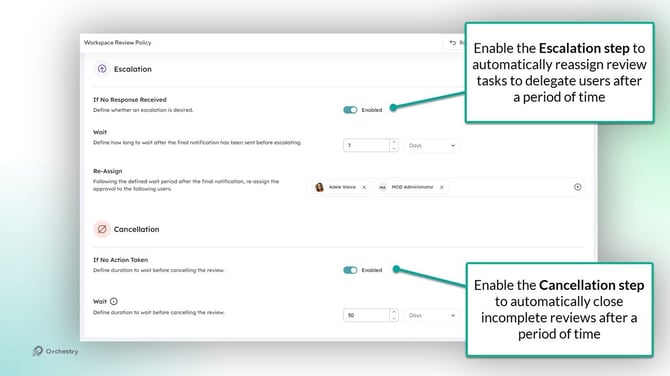
NOTE: if the policy does not have cancellation configured in the policy, Orchestry administrators can cancel incomplete reviews by removing the policy from the workspace.
Want to learn how to configure escalation and cancellation settings in Workspace Review policies?
Check out the article: How to Create a Workspace Review Policy
Can I Assign Workspace Review Policies to Different Types of Workspaces?
Yes, Workspace Review policies can be assigned to a mix of Teams, Team site or Viva Engage workspaces.
Does Deleted Version History Go to the Recycle Bin?
No, version history bypasses the SharePoint site recycle bin and is permanently deleted.
How Does the Manual Version History Cleanup Work?
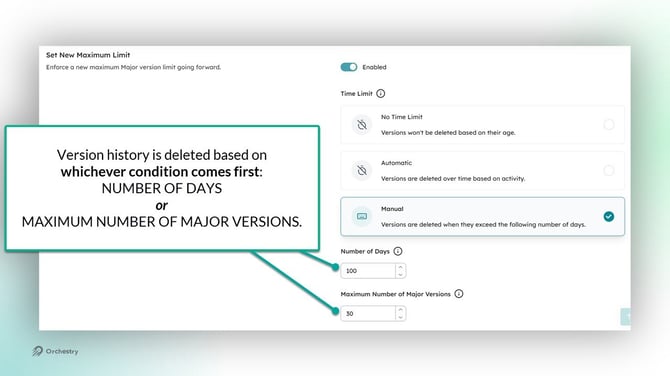
Orchestry uses Microsoft's methodology for deleting old version history. Either one of the two conditions can trigger archival:
- Maximum number of days is exceeded. The oldest version is deleted.
- Maximum number of Major Versions is exceeded. The oldest version is deleted.
Are Static and/or Dynamic Security Groups Supported in the Membership Review?
No, only direct M365 Group owners, members and guests are surfaced during the Membership Review step. Users added via security groups are not included in the reviews.