
Please note that this is not an exhaustive list of unsupported features and only seeks to serve as a guide for the product.
SharePoint Site Limitations
SharePoint Sites Permissions Counters
Only users in the default Member, Owner and Visitors will be counted. Other custom SharePoint Permissions groups will not be part of the counters.
Non-Group Connected Team Sites and Classic Sites
- Orchestry does not support Classic Site templates, or 'MySites' in either provisioning, life cycle management, reporting or visibility in the Workspace Directory
- Non-Group Connected Team Workspaces only support Orchestry's Archival policies
- Orchestry does not support reporting on converted sites from Non-Group connected to Group Connected.
Pages, Lists, Libraries and Views
- Views that are set to only show in a folder of a specific Content Type are not supported. However, views that are set to show in all folders will work (Updated April 2021)
- Default column values in lists and libraries are not supported
- Content Types Column Status Statuses such as Hidden is not carried over from live templates to provisioned sites by PNP
- Stream 'Playlist' template in SharePoint is not supported
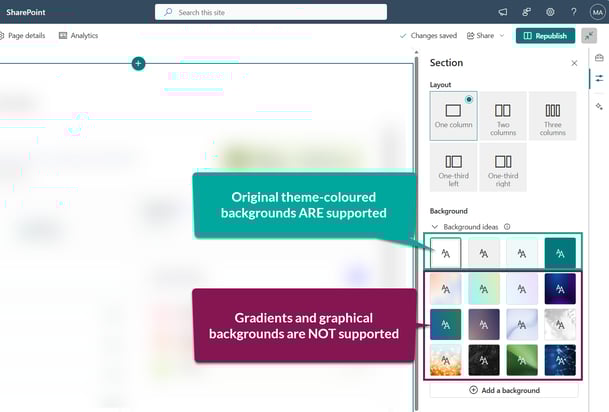
- Page section background images are not currently supported
- Page Templates are not supported. Having a page template in a Workspace template will cause extraction to fail (Updated April 2021)
- News Link pages are not supported as part of templates. Have a new link in a Workspace template will cause extraction and application to fail
PNP Fields Excluded from Orchestry Provisioning
These out-of-the-box PNP fields are excluded when Orchestry provisions a new SharePoint site. The fields will still exist in the SharePoint site, but Orchestry will not handle any changes made to them in a live template.
- _ColorHex
- _ColorTag
- _dlc_DocId
- _dlc_DocIdPersistId
- _dlc_DocIdUrl
- _ExpirationDate
- _ExtendedDescription (Description)
- A2ODMountCount
- MediaUserMetadata
- MediaGeneratedMetadata
- SectionImages
- TriggerFlowInfo
Web Parts and Page Sections
- Section backgrounds are not supported, outside of the base theme colours
- Full-width columns (page sections) are not supported
- New SharePoint page banners with full-width headers are not supported. Orchestry will remove the new Banner web part from SharePoint site pages.
- For non-home site pages that contain the new header, Orchestry will flip the header back to the previous style. Any customizations to the site header in the live template will not be copied during provisioning.
- This is related to Microsoft roadmap item 386905
- The 'Orchestry Tasks' web part cannot view Premium/Project Planner boards.
- Flexible columns (AKA page sections) are not supported. Orchestry will automatically turn these into one-column sections during provisioning
- To avoid loading errors, only use one Orchestry web part per site page.
Managed Path Support (Supported as of July 2023)
- Orchestry only supports the /sites managed path and does not support the /teams managed path. If this is configured, then it will cause Orchestry to fail in several areas
Language Support
- Orchestry only supports SharePoint templates where the SharePoint site base site language is English.
SharePoint Document ID and Document Sets
- Document ID Service is not currently supported.
- Document Sets are not currently supported.
Want to see these SharePoint features supported? Share your feedback here on Productboard.
Content Types
- Copied local terms from the Term store are not supported. Create terms from scratch to ensure provisioning jobs complete.
Microsoft Teams Limitations
- Orchestry does not support tabs and configuration on private channels. Private channels will be created during provisioning, but no customizations are possible.
- Archival policies cannot set private channels to the 'read-only' state (see Orchestry Updates for January 2025 | Part 2)
- Orchestry does not support shared channels:
- Any shared channels that are part of a live template will be converted to a standard channel during the provisioning process. Any customizations to the shared channel will NOT be preserved during provisioning either.
- Shared channels that require external users will NOT work in workspaces that also have Guest Request policies assigned to them. It's recommended to remove the request policy if external users are required for collaboration.
Office 365 Limitations (Word, Excel, OneNote, Loop, etc.)
OneNote Support
- Due to the difference in Class OneNote files, Orchestry doesn't support this capability. We can create a standard class OneNote but cannot copy a Class OneNote as part of a Live Template.
- OneNote team channel tabs provisioned from a live template cannot be pointed to any specific page or section. When a Teams workspace is provisioned from a live template that includes an OneNote tab, it will default to the root page or section.
- The 'Notebook' link included on the navigation of SharePoint Team Sites may not work with workspaces provisioned from a live template. To remedy this:
- For workspaces without Teams, replace the 'Notebook' URL in the site navigation
- For workspaces with Teams, load the 'Notes' channel tab to trigger the creation of the notebook. The 'Notebook' URL in the associated SharePoint site will work afterwards
Guest Management Support and Limitations
- Orchestry does not support guest users in SharePoint Communication Sites or Non Group-Connected SharePoint Sites.
- Orchestry does not support guest users in Viva Engage community workspaces.
- Guest users can only leverage Orchestry's 'People' and 'Tasks' web parts. Learn how to enable access in this article.
Other Limitations
Live Template Limitations
- The "Microsoft Lists" channel app cannot be copied
- The "Microsoft Planner" channel app cannot be copied
- The "Microsoft Loop" channel app can be copied, however - the source Loop workspace will be linked to the channel, instead of creating a new one.
- The 'Threads' channel layout is not supported
- The following Microsoft Teams settings cannot be copied during provisioning
- Allow members to upload custom apps
- Allow members to create, edit, and delete tags
- Anything under the sections "@mentions", "Fun stuff" and "Tags"
- The maximum size of a Workspace template, including documents should be no bigger than 200MB
- Viva Engage workspace templates do not support Live templates
Workspace Review Policy Limitations
- Any items (files) marked by a retention policy will NOT have their version history purged
- Membership reviews only apply to M365 Groups. SharePoint site membership (i.e.: SharePoint Groups members) are not included at this time.
- Workspace Reviews are not supported in non group-connected Team sites and Communication sites.
Multi-Geo Support Limitations
As of August 2024, multi-geo provisioning was added to Orchestry. The following limitations still apply:
- Live Template not supported
- Orchestry policy application not supported
- Sensitivity label application not supported
- Team Information Tab application not supported
- Workspace Information web part application not supported
- The Directory only shows workspaces within the default GEO
Orchestry Metadata Limitations
When Orchestry metadata is configured as a filter in the Workspace Directory, Orchestry adds a the new metadata field as indexed column to the associated 'Directory' list in your tenant's "Orchestry" SharePoint site.
Modern SharePoint site libraries and lists support a limit of 20 indexed columns. Orchestry uses 13/20 of the indexed columns out of the box, leaving you with up to 7 to use as you wish as directory filters.
Orchestry will not prohibit you from going past the limitations in SharePoint, but metadata filters may not work as expected if you run out of indexable columns. Exceeding the limits of filterable metadata fields may also negatively impact the overall performance of the Directory.
Workspace Requests Limitations
- HTML formatting is not supported in the 'Team description' or 'Site description' text fields when requesting a workspace.
Orchestry Lifecycle Management Limitations
- Currently, exporting reports is not possible if the SharePoint Site Description field include any HTML formatting.
Microsoft Planner Premium/Project Limitations
- Orchestry's Live Templates do not support Planner Premium (AKA Microsoft Project Online) boards at this time.
- Only standard Planner boards (https://planner.cloud.microsoft) can be copied when provisioning from a live template.
Archival Policy Limitations
- When archiving SharePoint Team sites, only users in the M365 Group roles can be removed . Any site-level (SharePoint Group) users will not be removed from the Team site.
Reporting Limitations
- Orchestry will only report on the first level of user permissions. For example, if the 'Members' of a M365 group includes another (nested) group, Orchestry will not expand on the members of that nested group.
Questions and Answers
Can I Install the Orchestry App into Outlook?
No, the Orchestry app can only be accessed via the web app (https://app.orchestry.com) and the official Teams app.
Want to know how to setup the Orchestry app in Microsoft?
Check out the article: Teams Application Configuration