
Approval Workflows are a feature of Workspace Provisioning that add an approval layer to workspace requests. Orchestry admins can reduce the sprawl of duplicate and redundant workspaces by adding Approval Workflows to their workspace templates.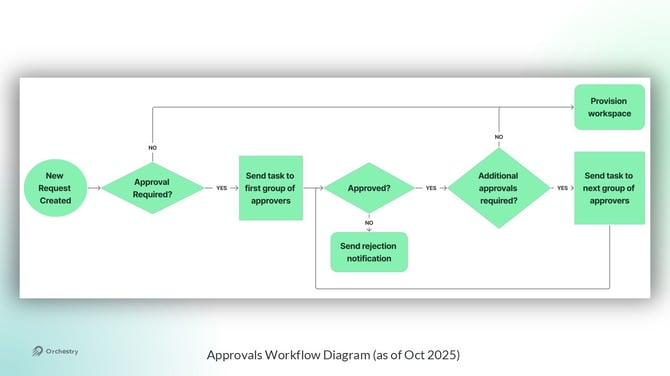
How to Create an Approval Workflow
By visiting the "Approval Workflows" page, you can view, create and manage multiple workflow approvals. Each workflow can be assigned to one or many workspace templates, regardless of type.
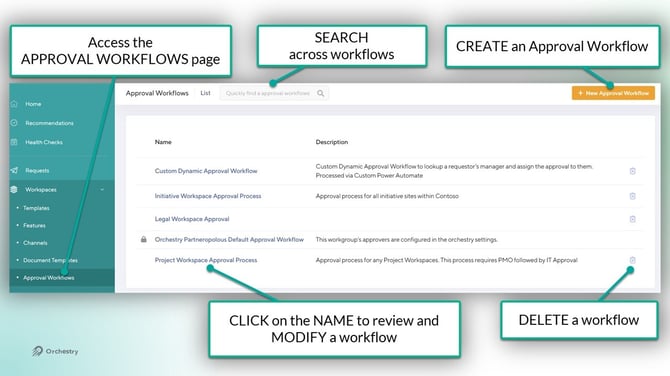
Each approval workflow is build out of STEPS and APPROVERS.
- Each STEP can have one or many approvers
- Only ONE person per step needs to give approval
- One ONE person needs to REJECT a request. No additional approvals will be sent after the request as been rejected.
- Add MULTIPLE STEPS when multiple levels of approval are needed
- You can assign (Entra) Security Groups to the approvers list
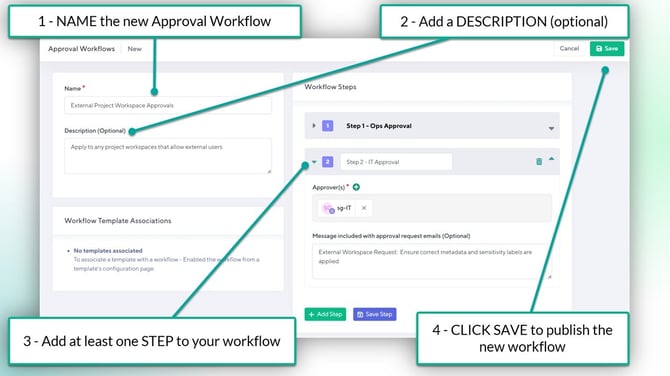
To create a NEW approval workflow:
- From the "Approval Workflows" page, click the NEW button
- Give the new workflow a name
- Give the workflow a description (optional). This will only be seen by admins
- For the FIRST STEP:
- Give it a NAME
- Assign at least ONE approver
- Add a custom message to the email notification sent to approvers (optional)
- Click SAVE STEP
- For additional approval layers, click ADD STEP and repeat steps A through D
- Click SAVE to publish the new Approval workflow
How to Assign an Approval Workflow to a Workspace Template
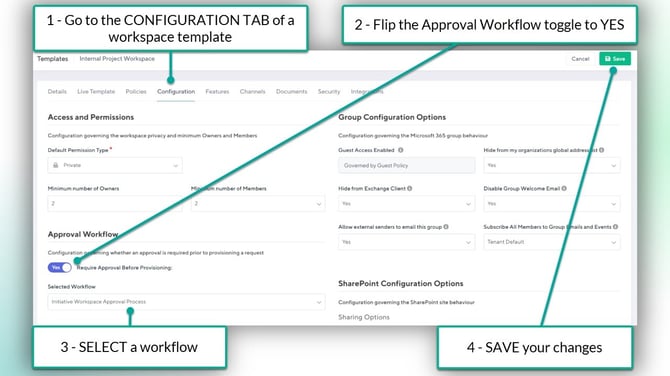
Workspace approvals can be assigned to any TYPE of workspace template from the 'Configuration' tab. This ensures any (or all) workspace requests are sent for approval before provisioning starts.
To assign an approval workflow:
- Open the CONFIGURATION tab of a workspace template
- Flip the "Require Approval Before Provisioning" toggle to YES
- Select a workflow
- SAVE your changes
Want to learn how to setup a workspace template?
Check out the article: How to Configure a Workspace Template
How to Approve a Workspace Request
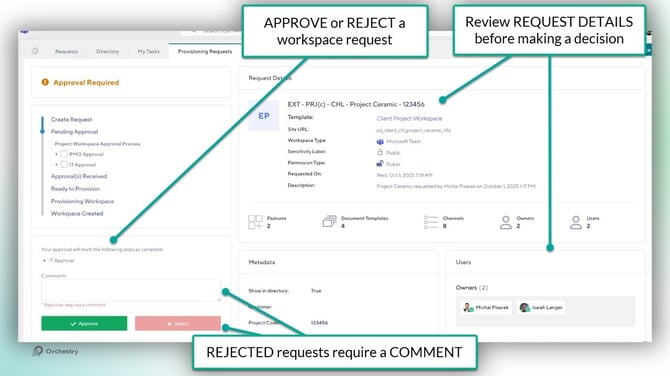
When a new request is received, the approvers are assigned a task in Orchestry. Approvers can:
- modify certain fields of the request (web app only),
- approve the request, or
- reject the request with (required) comments.
The Admin Override
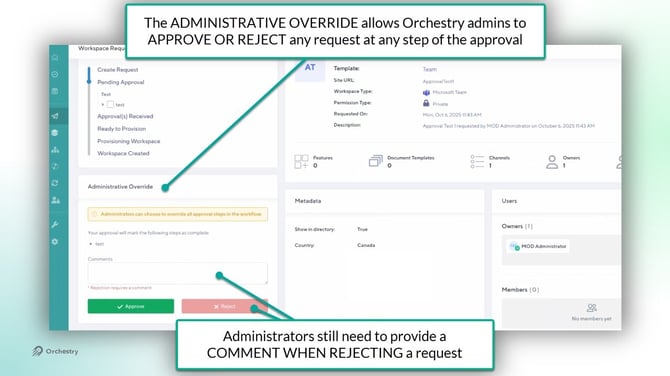
Orchestry admins can view, approve, reject or modify any request without being listed as an approver. To help ensure requests are left pending for too long, admins have access to the 'Admin Override' that will close the loop on approval workflows.
If an Orchestry admin uses the ADMIN OVERRIDE to approve a workspace request, any additional STEPS on the Approval Workflow are skipped and provisioning starts immediately.
- Use the standard approval option to respect the approval workflow
- Use the ADMIN OVERRIDE to skip additional approvals (steps) and start provisioning
Modifying a Workspace Request
Orchestry admins can modify the following fields when reviewing a workspace request:
- Workspace name
- Workspace URL
- Sensitivity Labels
- Permission Type (unless controlled by Sensitivity label)
- Workspace Description
- Workspace owners and members
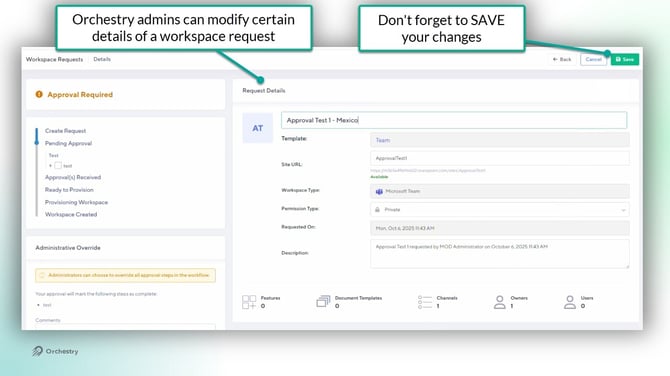
NOTE: the EDIT button is only available in the Orchestry web app
NOTE: Naming policies are NOT enforced at this stage. Admins should take note of the policy prior to making changes.
Want to learn about tasks in Orchestry?
Check out the article: Orchestry Tasks and Notifications Overview
Questions and Answers
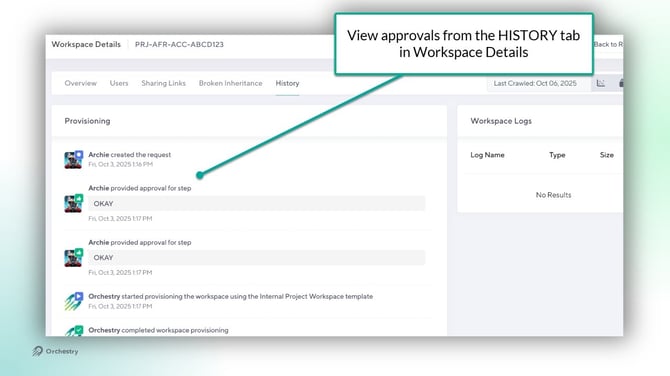
"Where can I see a history of approvals?"
There are two places you can see approval history:
- within the Request Approval (task), and
- the HISTORY tab within Workspace Details
Want to learn more about Workspace Details?
Check out the article: Workspace Details Page Overview
"Do approvers get sent email notifications for a workspace that they are supposed to approve?"
Yes they do. Each person in the approval workflow will get an email notification