
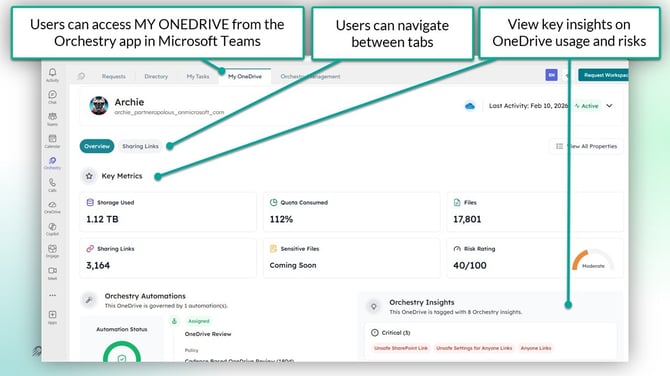
The 'My OneDrive' view in Orchestry allows end users to view insights about their usage, and manage sharing links created from their account.
Users can access their "My OneDrive" from the Orchestry app in Microsoft Teams.
Want to learn how Orchestry Admins can view insights for individual OneDrive accounts?
Check out the article: OneDrive Reports Overview
The 'My OneDrive' Overview Tab
End users can stay informed about their OneDrive usage from the Overview tab, which provides key metrics (i.e.: storage used), insights from Orchestry and automated policy coverage.
End users are not able to modify anything on the Overview tab.
The 'My OneDrive' Sharing Links Tab
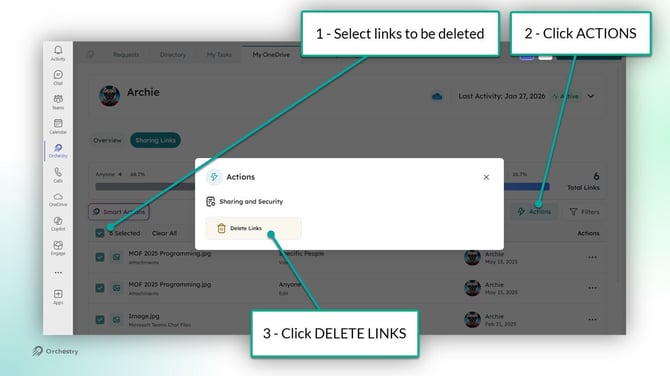
End users can view and delete their sharing links to ensure their content stays secure. Just like the Sharing Links tab in Workspace Details, users can view all of the sharing links created from their account and delete them as needed.
How End Users Delete Sharing Links from 'My OneDrive'
End users can delete sharing links in two ways:
- from the ACTIONs menu, and
- from the SMART ACTIONS menu
Want to teach your end users the 'My OneDrive' Experience?
Check out the article: End User Resources