
The months of December and January focused on improving Orchestry's underlying infrastructure, actioning feedback received after the launch of Guest Management (see Orchestry Updates for November 2022 : Orchestry Software) and implementing a long list of fixes to improve the experience for our users.
New Features
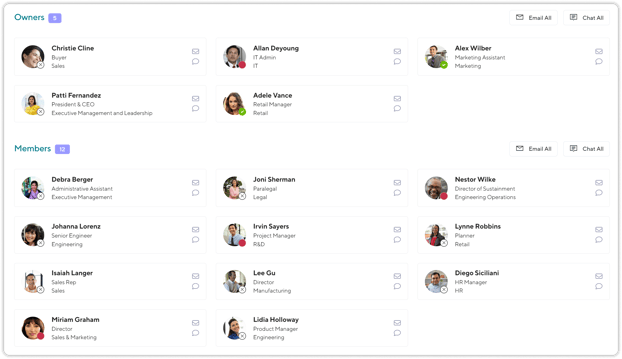
Owner / Member User Cards
Based on feedback from one customer, we have reverted some changes to the way Owners and Members were displayed in Lifecycle and in the Team Information Tab, and taken the opportunity to make some further improvements:
- Cards are more condensed, taking up less space
- Cards now display a user's Job Title (if available in AD)
- Cards now display a user's Department (if available in AD)
List Guests that are Part of the Current Request
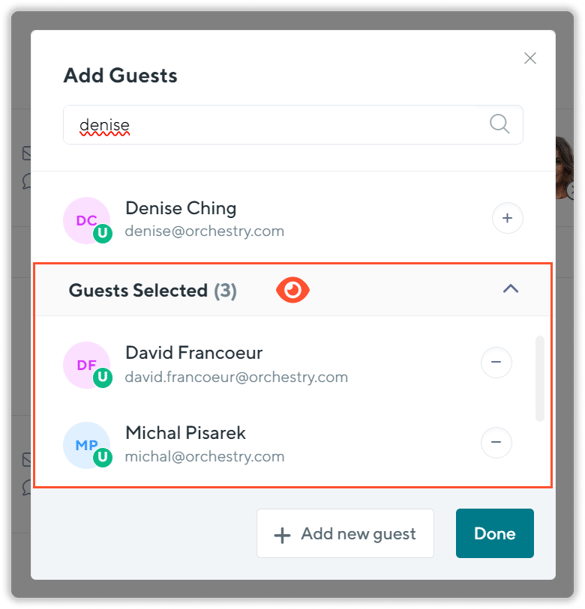
Previously it was not obvious in the UI if you had several guests that you had input but had not yet clicked the Done button. We have added a new section that displays the guests that are part of the current request so that a user has better visibility into what is going to happen next.
Allow Metadata Editing from Team Information Tab
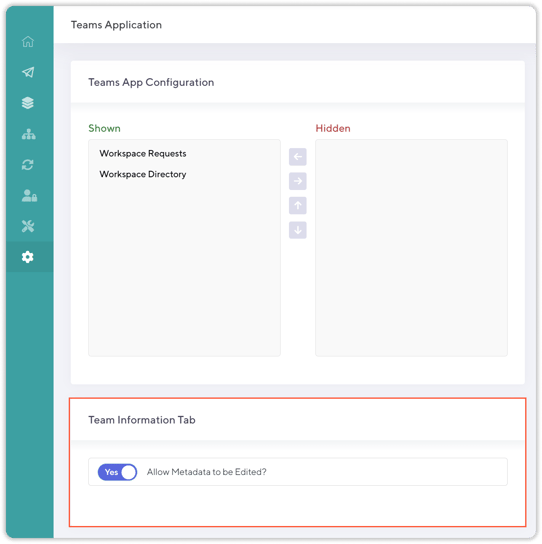
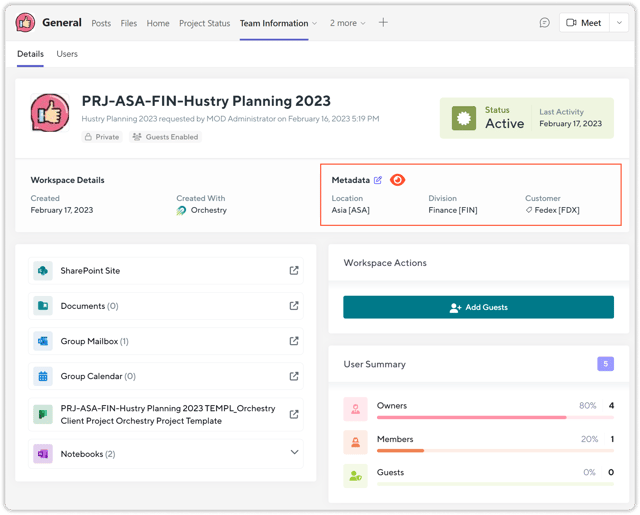
Within the recently updated Team Information tab, we introduced the ability for Team Owners to update the Orchestry metadata for that workspace, using the Edit icon. Some customers, however, requested that this be disabled to ensure the integrity of the metadata is preserved. We have introduce a new global toggle which determines whether or not you wish to have this option available across your tenant (under https://app.orchestry.com/settings/teams-app).
Note: This setting defaults to Disabled
To enable/disable this option:
Once enabled, the option is available to Team Owners:
Improvements
- Document Cloning Reliability: Thanks to a few clients who had reported this, we were able to dig deeply into the logs to determine that a certain set of factors could contribute to the files within a General channel folder failing to copy as part of provisioning from a Live Template.
- Prevent Workspaces to be Provisioned Without a Group URL (MailNickname): We were made aware of a couple ways it was possible to successfully request a workspace even if it did not have a fully formed Group URL which inevitable led to a failed provisioning request. This has been corrected int he back end with further improvements coming soon to the front end.
- Prevent Channels to be Provisioned with a Trailing Space: Previously there were a couple ways this could be done, and it could create problems during provisioning so we have made sure this is not possible going forward.
- Allow Channels of Two (2) Characters: Another ticket based on a customer request for a channel named 'QA' to be allowed, we have lowered the minimum character limit to 2 characters (previously 3).
- Added Guest Azure ID to Exported Reports: Another ticket based on a customer request, we have added a unique identifier to all guest rows (their AzureAD GUID) to ensure that exported Guest Reports now have a way to unique identify each account.
- Retain Generated Workspace Description: Previously when clicking into the Workspace Description that was auto-generated by Orchestry, it would completely clear the placeholder text. Instead, we now allow the user to append to the existing text, but they may choose to remove it all if they wish.
- Improved Workspace Inactivity Threshold Visibility: It is currently possible to have an archival policy attached to a workspace (where the policy has an inactivity threshold to trigger) but to override this threshold of days on a particular workspace, if desired. However, previously this override could be triggered accidentally and it was not easy for admins to tell the difference between those that were overridden and those that were not. We have now added a clear callout in the UI to help admins easily identify where this has happened.

- Updated Installer to Automatically Enable Guest Management: Previously this relied on an Administrator to enable, if the pre-requisites were met, but we now automatically do this check as part of the installation (See Guest Management FAQs)
- Added Loading Animations for Long Running Guest Processes: Depending on the number of records being modified, some guest processes may take a few second to complete. To make this clear to users, we have added loading animations and completion "toasts" (pop ups) to clearly relay the current status of an operation.
- Allow Team Archivals to have SharePoint Site Set to Read Only: Previously this option was not available for Teams, but only Team Sites - however the target is the same (a Team Site), therefore we have enabled this option for Archiving Teams as well, if using the Archive in Place method.
- Improved Workspace Details Header: We have improved the display on the Workspace Details Page and it now will correctly fetch the Requested By User's Profile Picture.
- Enforce Guest User Naming Convention: When Guest accounts are redeemed, and they exist in another tenant's M365 AD instance, the user's display name (constructed by Orchestry) would get overridden by their originating AD Display Name. We have added an enforcement that reverts this change to ensure the naming policy stays applied.
- Prevent Actions on Deleted Guests: Previously it was possible to accidentally re-send an invitation to a guest who had been deleted, which could result in their ability to receive a redemption email. We have added checks in Orchestry to prevent these being re-sent to deleted guests.
- Better Handling of Deleted Accounts: We have done a wide sweep through Orchestry notifications to enable better handling of notifications being sent to a group of individuals, where one or more of the individual accounts no longer exist (deleted). Orchestry will now skip attempting to send notifications to these deleted groups or accounts.
- Accessibility Improvements: We have improved text label contrast which were not fully WCAG compliant to ensure easy readability for users.
- Updated the Directory Settings Page: Simplified the page and updated the tooltips to ensure this page is easier to understand.
- Updated the Notifications Page: To avoid confusion, we have temporarily hidden the CC on Errors and CC on all Notifications, while we rework these functions to be better and more useful.
- Corrected Broken OneNote Teams Tabs: A change on the Microsoft side had a negative impact on all Orchestry-created OneNote tabs. We have updated Orchestry to add the required missing parameters and retroactively corrected any previously provisioned tabs.
- Improved Rich Text Editor Experience: Increase editor size and improved behaviour when used within the Teams Client.
- Updated Text and Localizations: Resolved some long standing grammatical mistakes as well as corrected some missing translations.