
What are the Requirements to use Guest Management Features?
To use the features you simply require Orchestry to be up to date, the Guest features enabled, and at least one Microsoft Entra ID P1 license in the environment. The new features come at no added cost and are included in your existing Orchestry subscription.
Licenses of Microsoft 365 E3 or above already include Entra ID P1, not to be confused with Office 365 E3)
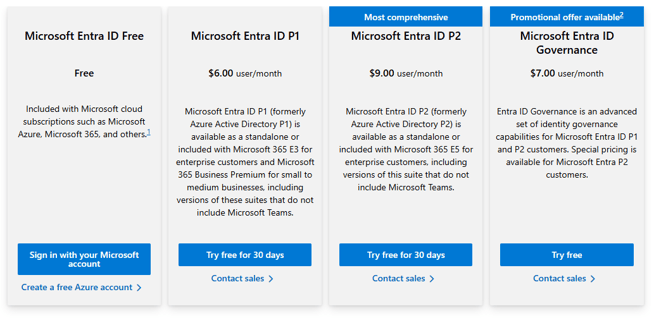
- For more detail see: https://www.microsoft.com/en-us/security/business/identity-access/azure-active-directory-pricing
- Compare Microsoft 365 E3 vs Office 365 E3: https://www.microsoft.com/en-us/microsoft-365/enterprise/compare-microsoft-365-and-office-365
What if I Don't Want to use the Guest Management Features?
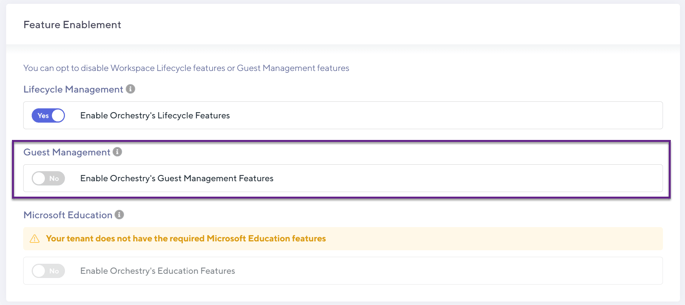
Guest management is enabled by default when Orchestry is installed, however you can disable the feature from the installation page as an Orchestry admin (Setting > Installation)
How Does This Impact my Environment?
If you choose to enable this new functionality (we think you should), you will see some changes to:
| Provisioning: | The Workspace Templates configuration now has a Policies tab which aggregates information about attached Policies (both lifecycle and guest variants). Additionally, if Guest Request Policies are enabled, end users will see a new experience to add Guests within the Permissions tab of the request wizard. |
| Guest Requests: | If enabled, users may receive notifications to approve new Guest accounts or memberships. |
| Guest Reviews: | If enabled, users may receive notifications to review existing Guest accounts. |
| Team Information Tab: | The tab has been redesigned to support additional functionality and the more action-oriented direction we want to take going forward. |
.png?width=640&height=354&name=cM1LJtO1gcJjMiFYR6b6HhRlmFjaN9KtJA%20(1).png)
What are the known limitations for these features?
Check out our article on known limitations within Orchestry.
Who Do I Contact if I Have Questions?
Questions, concerns? Reach out to us via our Support Portal or support@orchestry.com