
Should you need to uninstall Orchestry from your tenant, please follow the instructions below carefully to remove all components.
How to Delete Orchestry from Your Tenant
The steps below are best performed by a M365 Global admin.
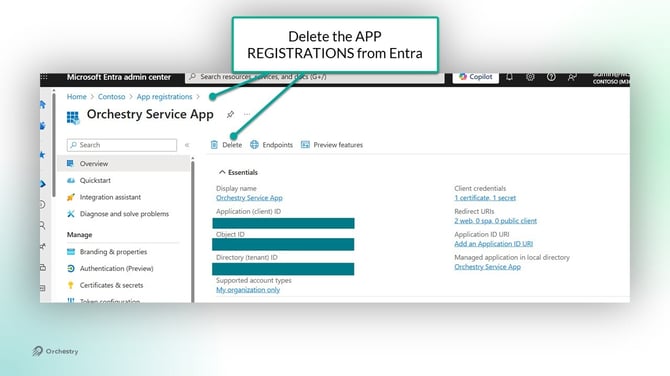
Step 1 - Remove App Registrations
This step removes both the enterprise app and app registration from your tenant:
-
Navigate to Entra > App Registrations > All Applications
- Delete the following (note some may not exist in your tenant):
- Orchestry Service App
- Orchestry Content App
- Orchestry API
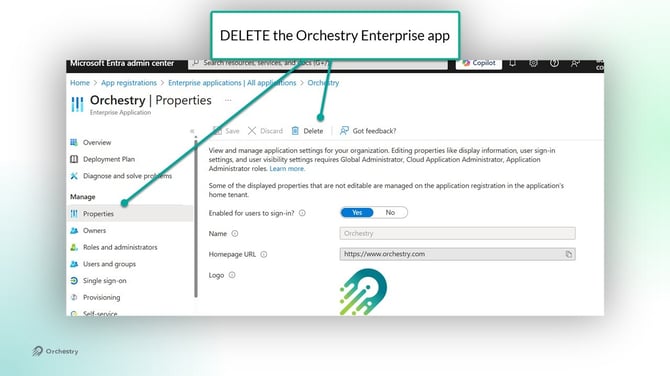
Step 2 - Remove the Orchestry Enterprise App
-
Navigate to Entra > Enterprise Apps
-
Open the Orchestry app
- DELETE the app from the 'Properties' page
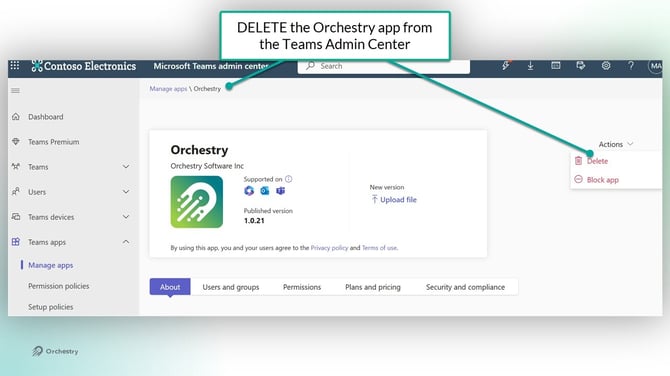
Step 3 - Delete the Orchestry Teams app
-
Navigate to the 'Manage Apps' page in the Teams Admin Center
- Open the Orchestry app and click DELETE (Actions > Delete)
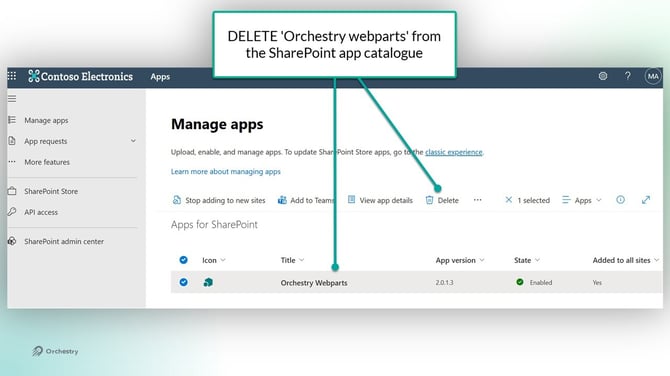
Step 4 - Delete the Orchestry Web Parts
-
Navigate to the SharePoint Apps catalogue (https://<yourtenant>.sharepoint.com/sites/AppCatalog)
- From SharePoint Admin, navigate to More Features > Apps
- DELETE 'Orchestry Webparts' from the list
Uninstalling Self-Hosted Orchestry
For tenants that self-host Orchestry, the listed steps above should still be followed. One additional consideration for cleanup is the database (i.e: Cosmos DB, Azure Storage, SQL Tenant storage) used to store your Orchestry data.
Before deleting the database, it is strongly recommended that you:
-
Review it for any additional workloads
- Consider creating a backup of the database
Deleting the Orchestry SharePoint Site
The Orchestry site (https://<yourtenant>.sharepoint.com/sites/Orchestry) is used to store the Orchestry Directory and logs from various jobs. This site will remain accessible even after completing all of the steps above.
Deleting this site is optional. Should you choose to delete it, we recommended to consider creating a backup of the data to avoid losing data needed for regulatory requirements in your industry.