
NOTE: This update does require your intervention but does not involve any downtime.
See the upgrade steps section of this article to get started.
Orchestry Recommendations Now Available
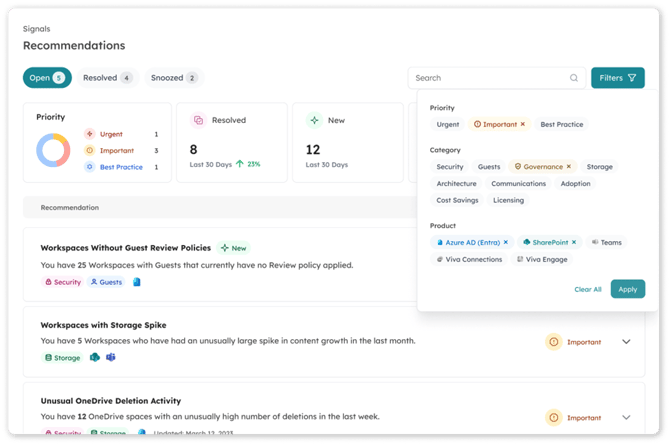
Now available as an integral part of the Orchestry platform, the Recommendations engine is designed to become the nexus for suggested actions and recommendations for your Microsoft 365 environment.
As an IT professional, begin your day viewing Orchestry’s latest recommendations – always reflecting the most recent activity and data in your tenant – and quickly get an overview of the areas that require your attention. These dynamic recommendations will provide clear direction on how to prioritize your valuable time and guide you through taking actions.
Rather than spending hours of grueling data analysis, let the machine learning of Orchestry’s Recommendations curate your experience and support you as if a team of Microsoft 365 experts were truly by your side. This will save you time, reduce costs and mitigate risk – and your users will thank you for it.
Upgrade Steps
To begin using Recommendations you must ensure you have upgraded Orchestry to the latest version. You must be a Global Admin to perform the upgrade as new permission consent is required.
To view the latest technical updates, consult the most recent version of the Orchestry Technical Overview.
Getting Started
Check out our knowledge base articles to get up to speed with Recommendations:
| Available Recommendations | A list of all recommendations in Orchestry to date, organized by 'priority' status. |
| Reviewing Open Recommendations | Learn about the 'Open' recommendations tab, such as the user interface and workflow |
| Reviewing Snoozed Recommendations | Learn about the 'Snoozed' recommendations tab, such as the user interface and workflow |
| Reviewing Resolved Recommendations | Learn about the 'Resolved' recommendations tab, such as the user interface and workflow |
| Learn how to resolve a recommendation, and what happens. | |
| How to Snooze and Un-Snooze a Recommendation | Learn how to snooze a recommendation and what happens. |
What Are Recommendations?
What problem are we solving?
Working with IT professionals for over a decade highlighted the challenges faced with both obtaining the data required to manage M365, as well as adequate tooling to effectively take action on this information. Without an elegant way to access a holistic view of this information, administrators were forced to cobble together PowerShell reports and hop from one admin center to another – all in an attempt to answer simple questions like “Is my environment protected?”
Even if you know the answer is no, how do you resolve it?
Rather than the alternative of fumbling in the dark, we decided to build a beautiful, yet powerful, interface that would illuminate this scattered yet critical information and help IT Administrators prioritize their efforts where it could have the most impact.
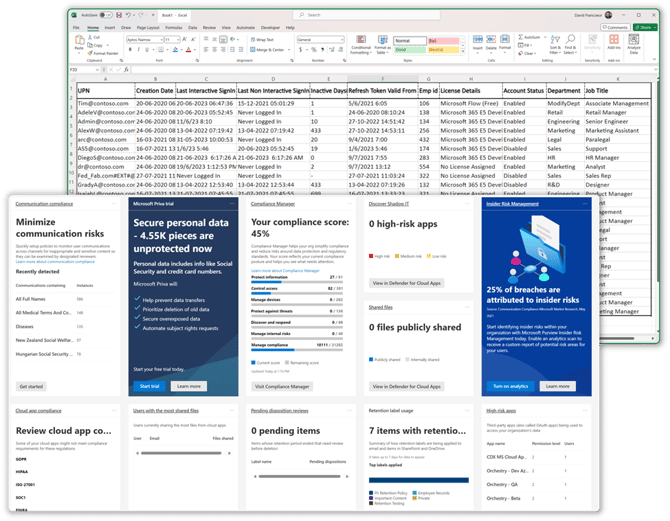 Figure 1. Microsoft Purview Home and Guest Inactivity Script (via o365reports.com)
Your Co-pilot in Managing M365 - View Recommendations Tailored to your Environment
Not every environment has the same challenges, nor the same goals. Receiving a list of universal recommendations defined by generic and static rules only adds to the information overload. Cut through the noise thanks to adaptive triggers, leveraging both practical expertise and the benefit of artificial intelligence, and get an experience that is tailored to you and your unique environment.
With Orchestry’s powerful data-collection and trend-monitoring capabilities, it is uniquely positioned to comb your vast Microsoft 365 dataset to create a fabric of information overlaid with insights that are genuinely useful and actionable.
This is a new experience that is built both for the small enterprise, without dedicated administrative resources, but also with the depth to support the largest enterprises equipped with teams of administrators – just like the rest of Orchestry.
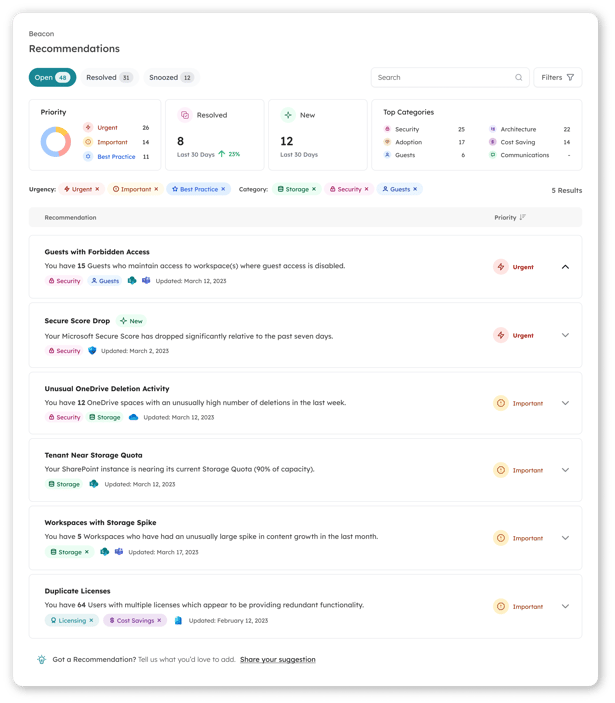 Figure 2. Recommendations tailored to your unique environment
As the Signals framework expands, look for new and meaningful ways for Recommendations to be further tailored and targeted directly to your environment based on your current priorities and needs.
Backed by Rationale and Explanation
Understanding the depths of Microsoft 365, including Security, Purview, Entra, Teams, SharePoint and others is outside the realm of possibility for most administrators and organizations. Some are fortunate to have access to outside expertise and consultants to help guide prioritization, decision making and execution of recommended actions in Microsoft 365. But even with expert help, all organizations are constrained in one way or another, whether it be budget, people, time, or information.
We believe that any tenant-level recommendation important enough to merit your attention also deserves its own detailed rationale and justification – not to mention easy access to curated resources. Only with this distilled wisdom at your fingertips can an informed decision be made.
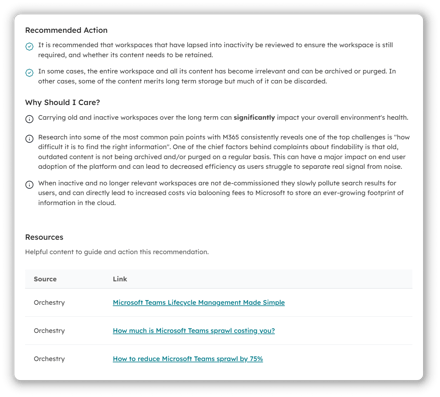 Figure 3. Every recommendation incudes detailed rationale and justification
Step-by-Step Guidance on Resolution
Orchestry won’t let you down in the all-important final step of the process: taking action. A complete, end-to-end experience for reviewing and resolving recommendations requires a process that facilitates easy and effective action. Let Orchestry’s team of experts guide you through each step of the process and check off that security risk or storage concern without breaking a sweat.
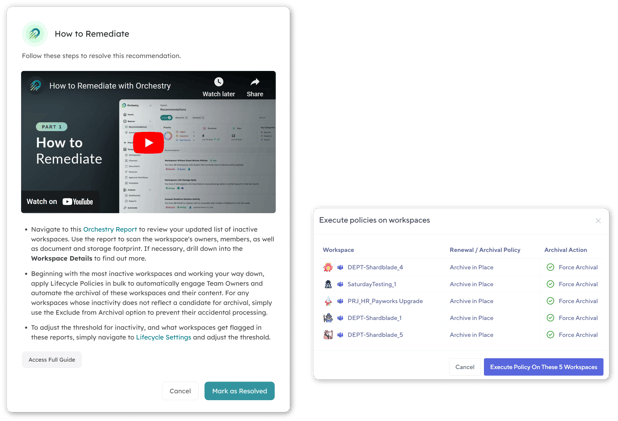 Figure 4. Step by step guidance on resolving your recommendations
As the Recommendation engine evolves, look for 1-click resolutions guided by the power of intuitive Orchestry automations.
Why Should I Care (AKA - the cost of doing nothing)
In a rapidly evolving cloud environment, the cost of analysis paralysis is enormous. Anything less than full-time hyper-vigilance can quickly lead to sprawl, skyrocketing storage requirements, security breaches, data loss, expensive redundant licensing, poor adoption and frustrated users.
The cost of doing nothing is simply too high. Let Orchestry guide you by prioritizing the areas that need attention and streamlining the necessary actions to restore best practices.
Getting Ready for Microsoft Copilot
Microsoft Copilot is poised to unlock amazing new potential in the way organization’s access and utilize content in their Microsoft 365 environment. Created to reduce the burden of mundane tasks, to inspire new heights of creativity, and to help provide focus on the activities that will drive your business forward. But are you ready?
Many organizations are still trying to grapple with the consequences of the rapid rollout of key workloads like Microsoft Teams during the pandemic. As a technology with tendrils in every crevice of your environment, your first step in investigating Copilot is in environment readiness.
Tackling sprawl is the first critical step on the journey to becoming Copilot ready.
Why? Outdated or unused sites can clutter search results and submerge your quality data under a mountain of detritus. The result is a Microsoft Copilot impaired by poor information.
The second major consideration is security hardening which requires nothing short of a comprehensive security audit across your tenant. Because Copilot’s data sources respect, any data that is improperly secured (accidentally or otherwise) is primed to be surfaced to the wrong audience and potentially cause significant problems for an organization.
The bottom line is that Copilot is exciting, but you must get your Microsoft 365 house in order before you launch to mitigate the risks of overexposure. Launching with recommendations centered around your tenant’s security, architecture, and sprawl – Orchestry will diagnose your issues and provide you a path to resolving many of the same challenges that must be overcome for Copilot.
Conclusion
With the oversight required for Microsoft 365 only growing, administrators need real help to keep pace with change, support their user base and safeguard their environment against threats. Like an intelligent assistant, Orchestry’s Recommendation engine will collate disparate sources of data into a cohesive tapestry and surface actionable insights tailored to your own environment. Backed by a team of Microsoft 365 experts, follow our step-by-step guidance to correct issues and return your environment to health. At last, a single pane of glass.
Orchestry Recommendations deliver consulting grade insights, tailored to your environment via AI and machine learning. Most importantly, this complex functionality is packaged in a beautiful and intuitive experience – exactly what you have come to expect from Orchestry.