
What is Workspace Management?
Workspace Management features in Orchestry provide you with the tools and insights to manage your workspaces, including
- A workspace dashboard to give you fast insights into how many workspaces you have in total, by type, privacy and more
- Built-in reports to help you quickly locate workspaces based on certain criteria (i.e.: inactive workspaces)
- Assign archival policies to automate the closure of old and inactive workspaces
- Assign workspace review policies to automate regular updates to group membership, reduce storage costs on version history and more
Workspace Dashboard
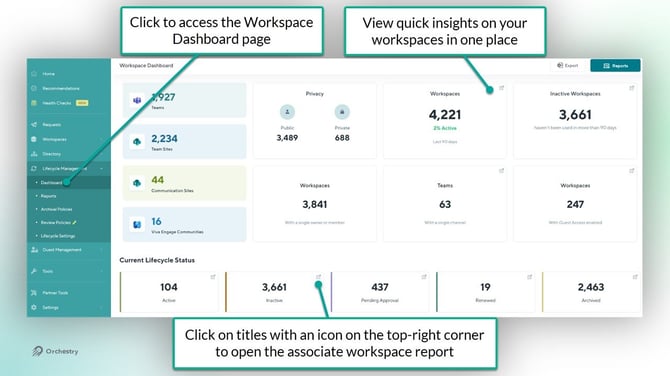
The Workspace Dashboard (Workspaces > Reports) provides an overview of your workspaces and provides all the relevant information that you need to help you stay in control.
TIP: Try clicking on a tile that has an icon on the top-right corner. This will open the associated report of the relevant workspaces.
Workspace Management Reports Page
The Workspace Management reports page (Workspaces > Reports) allows you to view and take certain action on your workspaces.
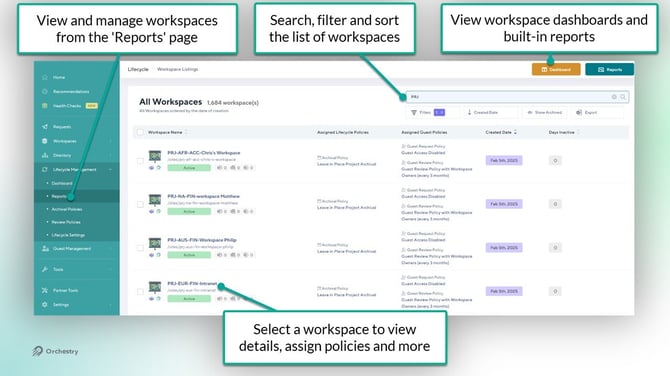
From the Reports page, you can
- Search and filter for specific workspaces
- View detailed insights on any workspace
- Assign policies to workspaces, including archival policies, workspace review policies and guest management policies.
- Explore your workspaces using the built-in reports for workspaces
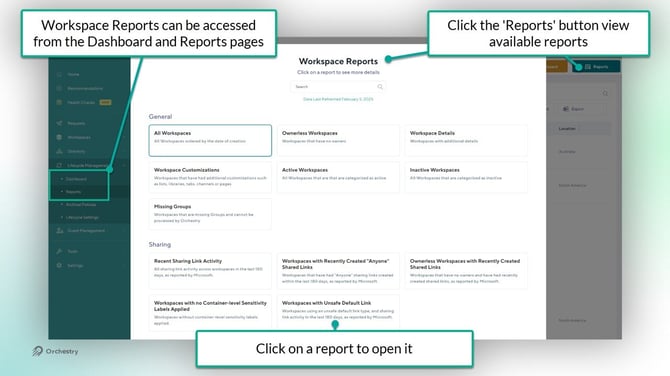
Want to learn more about how you can use Workspace Reports in Orchestry?
Check out the article: What can I do with Orchestry Workspace Reports?
Workspace Archival Policies
On the Workspace Archival Policies page (Workspaces > Archival Policies), you can design and manage policies that will automatically notify group owners to their renew, archive or delete their inactive workspaces.
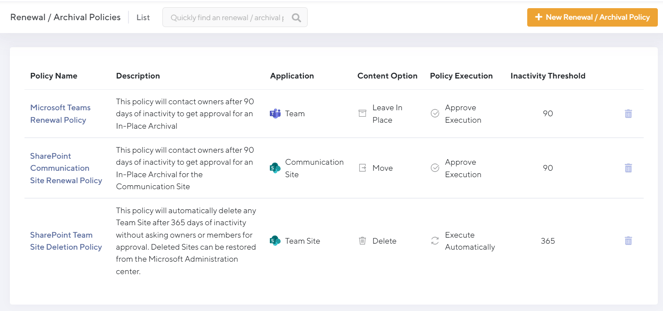
Ready to learn more about Orchestry's archival policies?
Check out the article: Archival Policies Overview
Workspace Review Policies
On the Workspace Review page, you can create policies that will trigger automatic, recurring reviews of active workspaces. These policies can be designed to perform any mix of the following:
- Remove excessive version history from document libraries, help you recover tenant storage
- Ensure the workspace membership is up to date
- Review and update M365 Group membership
- Review and update (container) Sensitivity labels
- Review and update workspace privacy settings, including search and Copilot visiblity
- Review and update Orchestry metadata
- Review and clean-up sharing links
- Archive a workspace early
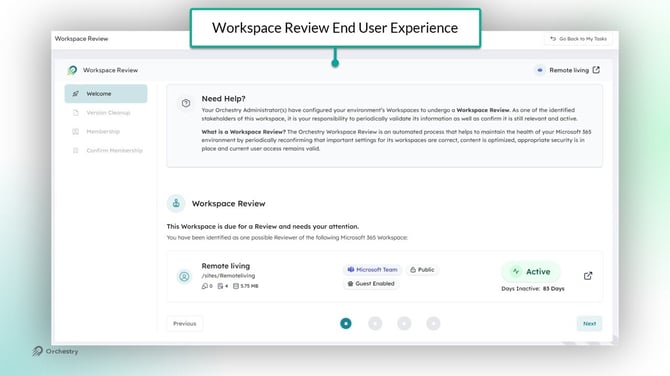
Ready to learn more about Orchestry's Workspace Review Policies?
Check out the article: Workspace Review Policies Overview
Known Limitations with Workspace Management Features
Learn about other Orchestry limitations in the article: Orchestry Unsupported Features/Limitations List
Retention Policies
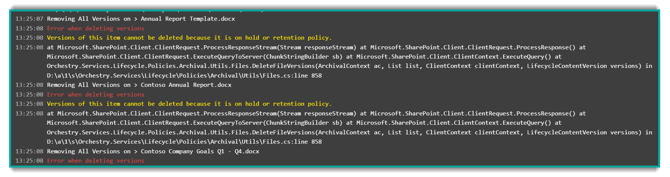
If you have retention policies set on a Team, Group or Site there will be certain actions that Orchestry will not be able to perform. Orchestry will always ensure that any compliance rules are respected during the archiving process.
SharePoint Site Lock
If the SharePoint site is subject to a Site Lock then Orchestry will not be able to perform any SharePoint operations on the site.
Orchestry will not attempt to unlock the site to perform operations except in the case of a Second Stage Archival where the first stage has left the site locked, and it must be unlocked to perform the next step.
Copy to Folder Limitations
Orchestry cannot copy over .mov files during an archival using the 'Copy to Folder' function.
Viva Engage Communities
While you can apply archival policies to Viva Engage workspaces and templates, only the associated M365 Group and SharePoint site contents can be archived.
All community content (messages, polls, Q&A, etc.) is not included in the archival by Orchestry at this time.
TIP: Global admins can export community content to CSV from the Viva Engage admin center.
Workspace Management Questions and Answers
Can private channels be archived along with my Microsoft Teams workspaces?
Yes, private channels can be archived along with your Teams workspaces when you use Orchestry's Workspace Archival policies. This includes (within each private channel):
- Processing Documents
- Extracting Lists
- Extracting Metadata
- Removing Site from Search Index (and Copilot)
- Change and Record Membership
- Export Conversations
- Delete Site
Note that Orchestry will not set the private channel's (SharePoint) site collection as read-only. Please see this announcement for more details.
Can shared channels be archived along with my Microsoft Teams workspaces?
No, shared channels are not supported by Orchestry and will not be archived along with the workspace.