Overview
Workspaces can sometimes get disconnected from their workspaces, and leave them only partially archived or deleted.
This can happen in different ways, but a common example is when there's a retention policy applied to a workspace. Orchestry cannot overrule retention policies when executing archival jobs, leaving you with a workspace that hasn't been fully archived or deleted.
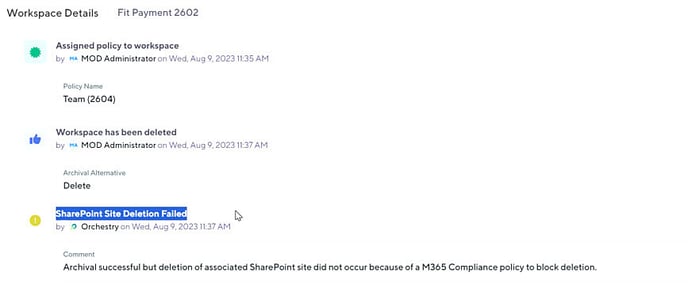
The Lifecycle tab in Workspace Details logs when a part of your workspace is prohibited from archival or deletion due to a M365 compliance policy
How to Archive Groupless Workspace (Video)
How to Archive Groupless Workspace
- Locate your groupless workspaces in Orchestry using Recommendations or one of the built-in workspace report available in Orchestry.
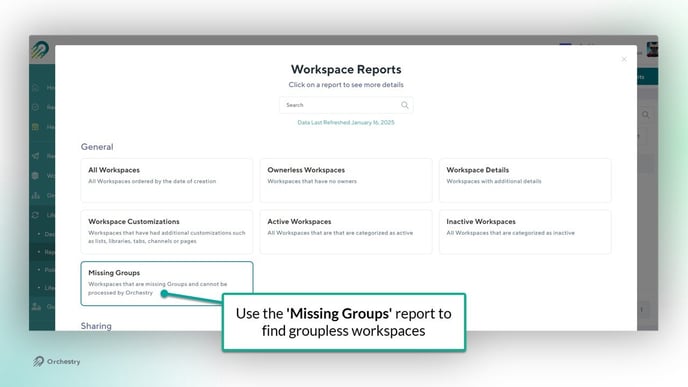
- From the Reports page, click a workspace title to open the Workspace Details page.
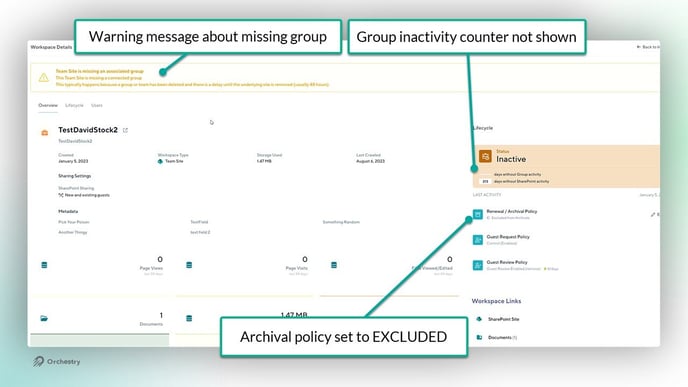
- Click the EDIT button for the 'Renewal/Archival' policy
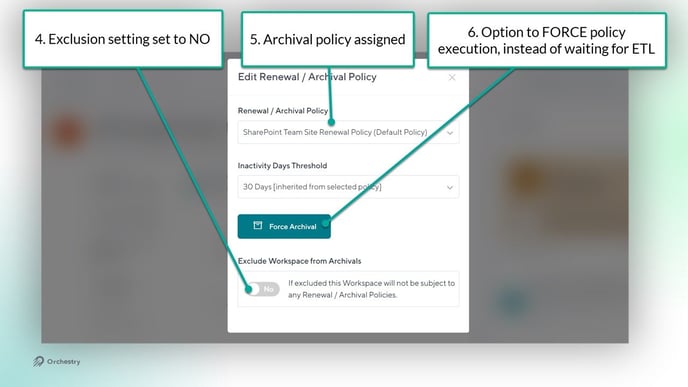
- Set the 'Exclude from Archival' policy to NO
- Assign a new archival policy to the workspace
- Execute the archival policy by either FORCING it, or waiting for the next ETL crawl