
What is a Workspace Provisioning in Orchestry?
Orchestry can be used as the go-to method for creating new M365 workspaces such as Teams workspaces, SharePoint team sites, communication sites and Viva Engage communities. Workspace provisioning is the process of Orchestry creating these curated workspaces
By directing end users to use Orchestry to request new workspaces, you can provide them with customized environments that have security and governance baked-in.
Want to learn more about workspaces?
Check out the article: What is a Workspace?
What is a Workspace Request?
End users can use Orchestry to submit requests for new workspaces. By disabling native methods of creating new SharePoint sites and Microsoft 365 groups, Orchestry can be the go-to option for creating new Teams, sites and communities.
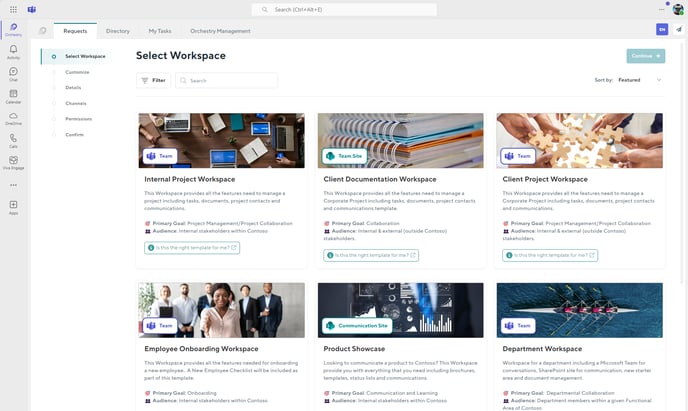
What end users can request is based on the workspace templates created and managed by Orchestry admins.
End users can submit these requests through the Orchestry app in Microsoft Teams, and/or Orchestry's 'Requests' web part.
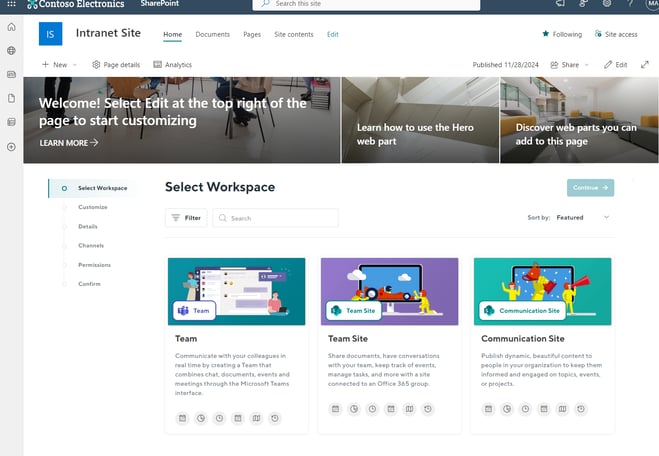
Want to learn more about workspace requests?
Check out the article: Requests Overview
What is a Workspace Template?
Workspace templates are used to design workspaces that end-users can request for provisioning. Orchestry administrators are responsible for designing and managing these templates to ensure they meet the needs of the organization.
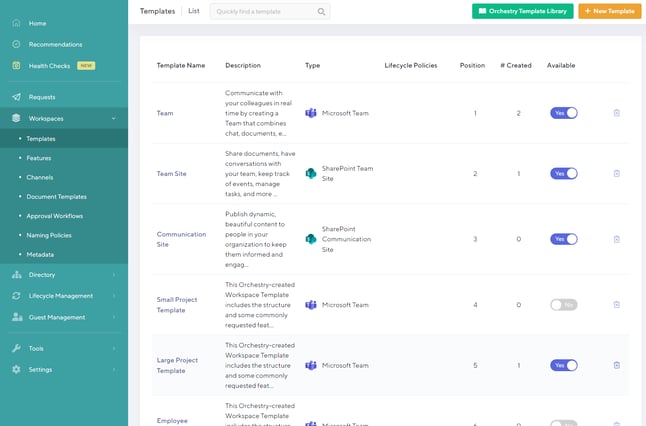
You can create workspace templates for:
- Microsoft teams workspaces
- SharePoint Team sites
- SharePoint communication sites
- Viva Engage communities
Want to learn more about the different types of workspaces?
Check out the article: What Kind of Workspaces Can I Create?
How to Create a Workspace Template?
Creating a new workspace template can be as simple or complex as you need them to be. In the video below, learn how to create and publish a workspace template for your end users.
Workspaces can be either configured as STATIC templates, or LIVE templates:
- Live templates are connected to an existing M365 workspace, giving you the ability deeply customize your workspaces. This enables you to copy workspace settings such as Teams channels, channel tabs, SharePoint document libraries, lists, and more.
- Static templates are simply workspace templates that are NOT connected to an existing M365 workspace. All configurations and customizations are handled within the template.
Want to learn more about the differences between LIVE and STATIC workspace templates?
Check out the article: What is the difference between a Live Template and a Static Template