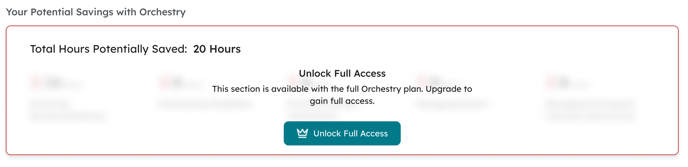
Health Check reports include data-driven insights on the health of your Microsoft 365 tenant, how much you're leveraging Orchestry features, recommendations and more.
The Report Header Section

| 1 - Report Name and Date Range: | This cannot be edited. |
| 2 - Share Button: | Share the published report with individuals across the organization. Only provides VIEW access (learn more about the 'Viewer' role here) |
| 3 - Download Button: | Opens the report into a PDF-friendly format when you need a local copy. |
| 4 - Edit Button: | Allows Orchestry admins and Health Check reviewers to leave annotations and add custom recommendations to the report. |
| 5 - Publish Button: | Publish a report to make it accessible to Health Check viewers (i.e.: management). Viewer are notified via email and Microsoft Teams. |
Orchestry Usage Section
A high-level look at the Orchestry features leveraged in the date range period. This section can also be compared to insights from the previous period for additional context.
Orchestry Beacon subscribers can see this section by upgrading to a full Orchestry plan. Contact your Orchestry partner or get in touch with us to get started.
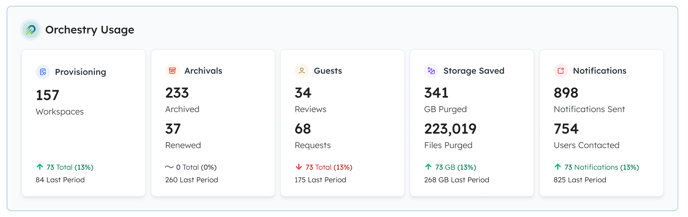
| Provisioning: | The number of workspaces created during the period |
| Archivals: | The number of workspaces archived and renewed in the period |
| Guests: | The number of guest reviews and requests completed in the period |
| Storage Saved: | Tenant storage recovered from workspace archivals and deletions |
| Notifications: | Orchestry notifications sent to users. |
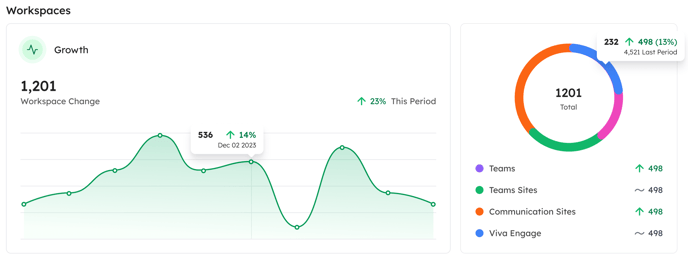
Workspaces Section
Quickly see whether your total number of workspaces has grown or shrank since the last period. Also includes a breakdown by workspace type (teams, SharePoint team sites, SharePoint communication sites, and Viva Engage communities)
Benchmarks
There are three benchmarks available in health check reports
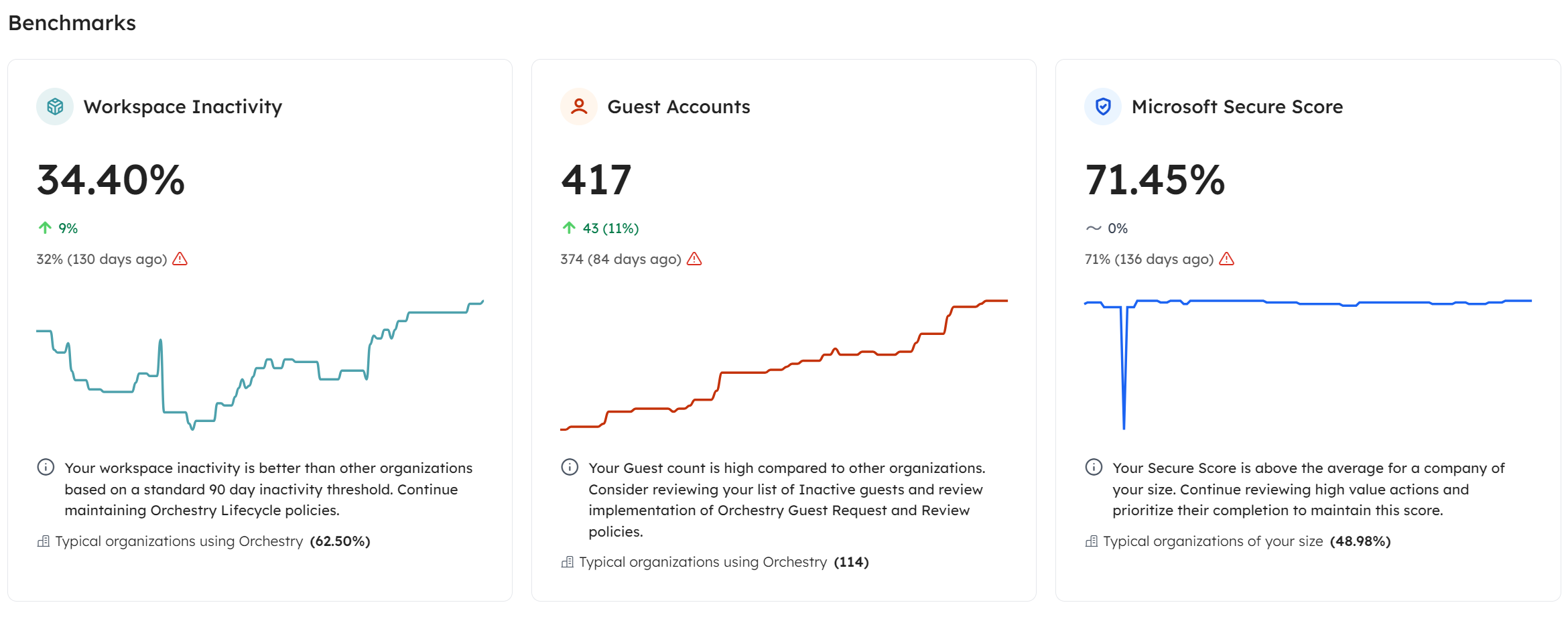
| Workspace Inactivity: | Reports the percent of inactive workspaces in your tenant, which is compared against typical organizations the same size as your own. The trend lines help you track whether this number has increased or decreased since the last period. |
| Guest Accounts: | Reports a count of the guests in your tenant during that period, which is compared against other orgs of your size. Trend lines help you determine how your guest count has changed since the last period. |
| Microsoft Secure Score | This is the cumulative score provided by Microsoft that compares various data points against other orgs of your size. Learn more about Secure score here. |
Sharing Links Created
This section provides a summary of share links created within the last 180 days.

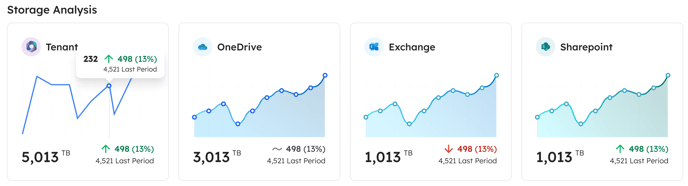
Storage Analysis
This section provides a glance at your tenant storage for the period, with breakdowns across OneDrive, SharePoint and Exchange.
Teams Engagement This Period
This section provides quick insights on Microsoft Teams usage, including average daily users, channels messages, chat, reactions and mentions.

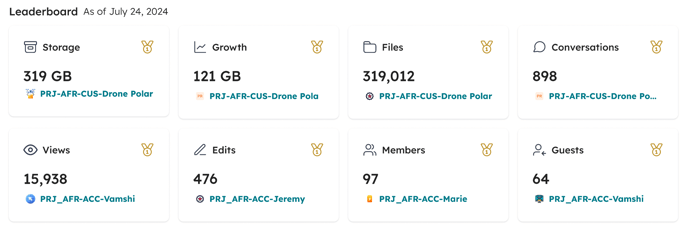
Leaderboard
This sections shows which workspaces are 'leaders' across different metrics.
Orchestry Recommendations
Shows a list of your open Orchestry recommendations, sorted by the most urgent. Custom recommendations will not appear here.

To learn more about recommendations, check out our Recommendations Overview article.
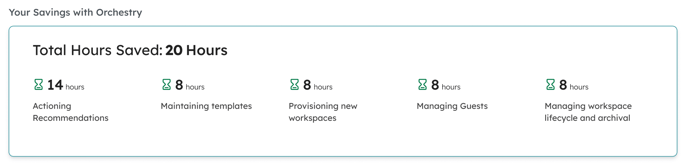
Your Savings with Orchestry
This section provides a breakdown of the hours saved using Orchestry to manage your workspaces, guests and more.
Orchestry Beacon subscribers can see all of this data by upgrading to a full Orchestry plan. Contact your Orchestry partner or get in touch with us to get started.