
Workspace Insights are labels that are designed to help you identify workspaces that may be operating outside the boundaries of your security and governance policies.
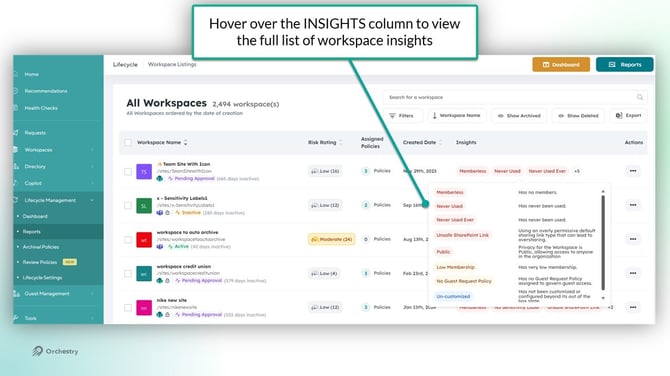
Workspace Insights and Definitions
|
INSIGHT NAME |
DESCRIPTION |
|---|---|
|
Workspaces that are Candidates for Archival |
Workspace is inactive based on last activity date and tenant settings; excludes archived, pending approval, renewed/extended, classic, OneDrive, and protected workspaces. |
|
Workspaces with Low Membership |
Workspace has fewer than 3 unique members (including owners); excludes archived, classic, and OneDrive sites. |
|
Workspaces without Members |
Workspace has zero members; excludes archived, classic, communication, and OneDrive sites. |
|
Workspaces without Guest Request Policies |
No guest request policy assigned; checks tenant and workspace-level policies; excludes classic and OneDrive sites. |
|
Workspaces without Guest Review Policies |
No guest review policy assigned; checks tenant and workspace-level policies; excludes classic and OneDrive sites. |
|
Workspaces with No Archival/Renewal Policies |
No archival policy applied; checks tenant and workspace-level policies; excludes archived, pending approval, renewed/extended, classic, OneDrive, and protected workspaces. |
|
Workspaces without Owners |
Workspace has zero owners; excludes classic sites. |
|
Never Used Workspace |
Workspace has never been used (no activity since creation or last activity within 1 day of creation); excludes archived, classic, and OneDrive sites. |
|
Workspaces with Guest Access Settings Mismatch |
Guest access settings for Teams and SharePoint do not match; excludes communication, classic, and OneDrive sites. |
|
No Hub Sites |
Site collection is not designated as a Hub Site; excludes classic and OneDrive sites. |
|
Team Information Tab Not Used |
Teams workspace does not have the Orchestry Team Information Tab deployed; excludes archived, pending approval, classic, and OneDrive sites. |
|
Workspaces with No Content |
Workspace older than 5 days with less than 2 site pages, 1 document, and 1 manual list item; excludes classic and OneDrive sites. |
|
Workspaces with No Conversations |
Team has no conversation since creation; excludes archived, pending approval, classic, and OneDrive sites. |
|
Workspaces with Forbidden Guests |
Guest access disabled but guests are present; excludes communication, classic, and OneDrive sites. |
|
Workspaces with Unredeemed Guests |
Guests have unredeemed invitations for over 90 days; excludes communication, classic, and OneDrive sites. |
|
Workspaces with Inactive Guests |
Guests flagged as inactive based on last activity and tenant threshold; excludes communication, classic, and OneDrive sites. |
|
Bloated Workspaces |
At least one SharePoint library has over 5,000 files; excludes archived, pending approval, classic, and OneDrive sites. |
|
Workspaces with Subsites |
Workspace contains at least one subsite; excludes classic sites. |
|
High Number of Private Channels |
More than 50% or at least 5 private channels in a Teams workspace; excludes archived, failed, classic, and OneDrive sites. |
|
Classic Sites |
Site collection created as a classic site (deprecated); excludes OneDrive sites. |
|
Guests From Blocked Domains |
Workspace contains guests from blocked domains; excludes communication and classic sites. |
|
Too Many Owners |
Workspace has over 20 owners; excludes classic sites. |
|
Workspaces without Customization |
Workspace not customized beyond out-of-the-box state; excludes archived, pending approval, classic, and OneDrive sites. |
|
Large Workspaces |
Workspace storage exceeds 1 TB; excludes archived, classic, and OneDrive sites. |
|
No Home Site(s) |
Site collection is not designated as a Home Site; excludes classic and OneDrive sites. |
|
Workspace Near Storage Limit |
Workspace storage usage is 90% or more of quota; excludes archived, classic, and OneDrive sites. |
|
No Organizational News Sites |
Site collection is not designated as an Organizational News Site. |
|
Workspaces with Bad Names |
Workspace title contains blocked words; excludes pending approval, archived, classic, and OneDrive sites. |
|
Workspaces with Recently Created “Anyone” Links |
Workspace has anyone (anonymous) links created in the last 180 days. |
|
Ownerless Workspaces with Recently Created Shared Links |
Ownerless workspace with shared links (company, anonymous, secure) created in the last 180 days. |
|
Workspaces with Guests to Review |
Workspace has guests pending review for over a year; excludes communication, classic, and OneDrive sites. |
|
No Container Level Sensitivity Label Applied |
Workspace has no container-level sensitivity label applied; excludes classic sites. |
|
Workspaces with an Unsafe Default Sharing Link |
Workspace uses an overly permissive default sharing link type (not "existing access"); excludes classic sites. |