
Overview of the Snoozed Tab
The 'Snoozed' tab consists of recommendations that you have either temporarily or permanently snoozed.
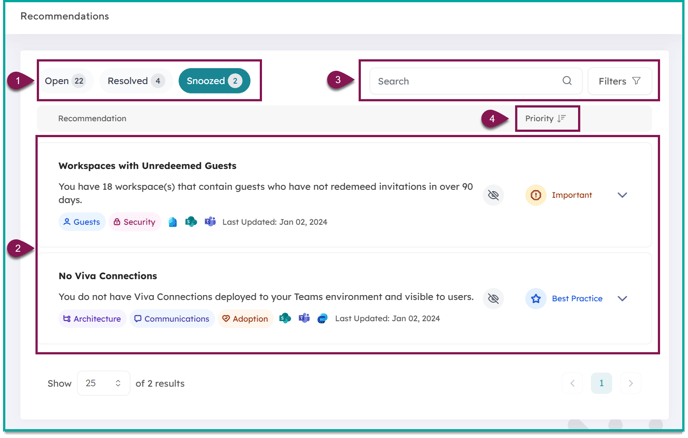
| 1. Recommendations Navigation: | Navigate between the 'Open', 'Resolved', and 'Snoozed' tabs |
| 2. Snoozed Recommendations: | Recommendations that have been snoozed. Orchestry admins can re-open recommendations if/when the work is relevant. |
| 3. Search & Filter: | Narrow down results by applying a filter or using the search bar |
| 4. Sort by Priority: | Recommendations are sorted by priority. You can sort the list in ascending or descending order |
Reviewing Snoozed Recommendation Details
By clicking on a snoozed recommendation, you can view it's history, provide feedback, view recommended actions, and re-open the item.
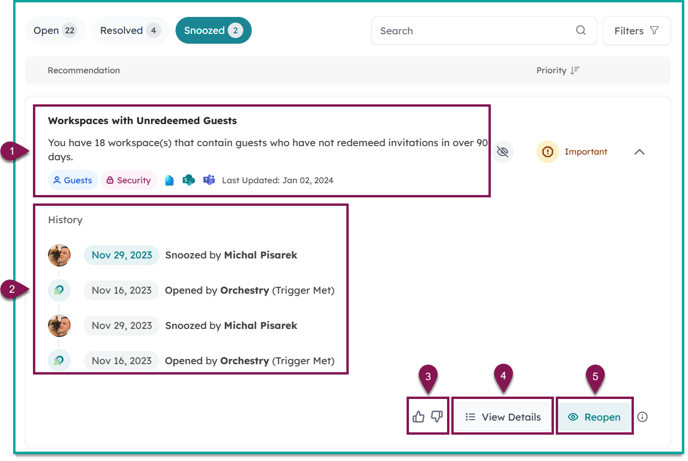
| 1. Recommendation Summary: | Name and description of the recommendation. Also includes categories and the date the recommendation was last updated. |
| 2. History: | The activity history includes every action taken to the recommendation, including when it was snoozed, and who snoozed it. |
| 3. Give Feedback: | Send the Orchestry team instant feedback on a recommendation by giving it a thumbs-up or thumbs-down. |
| 4. View Details: | Clicking the 'View Details' button opens a window that includes recommended actions, why it matters and resources to help you get started. |
| 5. Reopen: |
Clicking REOPEN will flag Orchestry to rescan the recommendation during the next overnight scan. If the work to resolve the recommendation has been completed, it will move to the 'Resolved' state. If not, it will move to the 'OPEN' state. |
How to Snooze and Un-Snooze a Recommendation
To learn how to use the 'Snooze' function for recommendations, check out this article: How to Snooze and Un-Snooze a Recommendation.