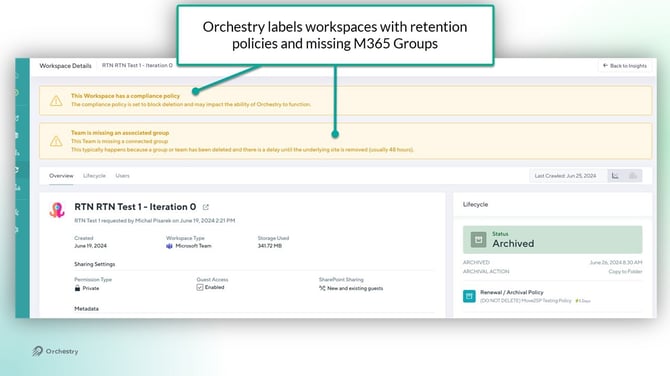
Orchestry can detect when Purview retention labels are assigned to a group and/or site (container-level). Assignments and modifications to retention labels are picked-up during the ETL scan.
Admins should have an understanding of the container-level retention policies used in their tenant and plan the use of Orchestry archival policies accordingly.
NOTE: Item-level retention labels are not recognized by Orchestry.
How Retention Labels Impact Orchestry Archival Jobs
Retention policies can be scoped to block destructive operations on SharePoint sites, such as deleting site content. Orchestry is designed to NOT override retention labels and to NOT delete site collections.
| SharePoint site | Retained (deletion blocked by retention labels/policies) |
|---|---|
| Microsoft 365 Group | Deleted |
| Microsoft Teams | Deleted |
| Documents & versions | Retained and unchanged |
The outcome of running an archival job on a workspace with retention labels will vary based on the archival method.
'Deletion' Archival Policies
With the 'Delete' archival method, the site and contents are retained. Any associated Team channels and/or M365 Group is deleted.
'Move to SharePoint' Archival Policies
The 'Move to SharePoint' archival method copies files from the source workspace to the destination archival site. The retention policy remains active on the source site and files, but NOT the copied files.
-
Version history is NOT deleted
-
If applicable, the M365 Group and Team will be deleted
'Archive In-Place' Archival Policies
For the 'Archive In-Place' archival method, nothing is deleted unless the 'Second Step' workflow is enabled. If the Second Step is used, it will follow the same logic as the 'Move to SharePoint' and 'Deletion' archival methods described above.
-
Version history is NOT deleted
-
If applicable (with the 'Second Step' workflow), the M365 Group and Team will be deleted