
Workspace Reporting Now Supports More Types of Workspaces
“No more blind spots. Full inventory. Full confidence.”
Orchestry delivers Unified Multi-Object Reporting — the most comprehensive Microsoft 365 workspace inventory available. This expansion doubles the breadth of supported object types reported across tenants, eliminating blind spots that previously concealed 5-25% of customer site architectures.
For the first time, customers can view, govern, and report on their entire workspace landscape — modern and legacy — within a single pane of glass. Orchestry now supports Directory and Reporting for:
- Classic Sites (new)
- Private Channel Sites (new)
- Shared Channel Sites (new)
- Team Site - Without M365 Group (new)
- Team Site - With M365 Group
- Team
- Communication Site
- Viva Engage Community
You can find the new workspace types on the Workspace Dashboard and the Workspace Reports (Listings) page: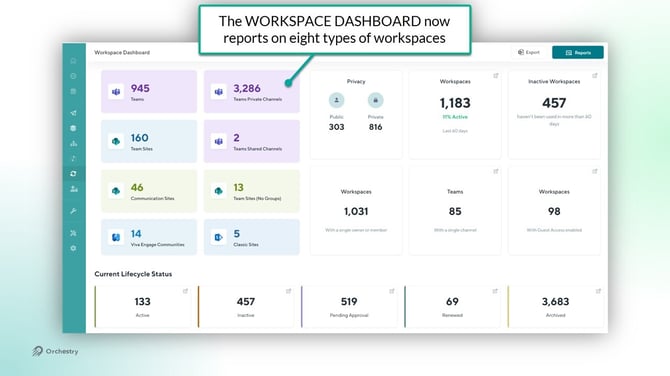
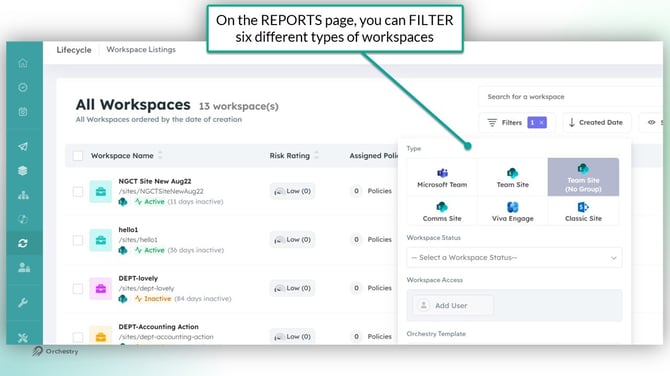
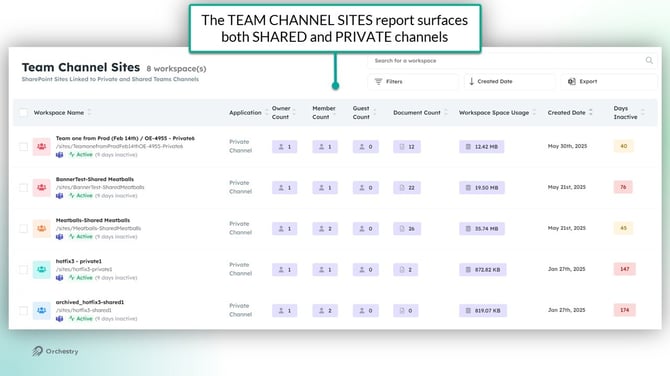
In the future we will be adding better automation support for these new object types based on your feedback. Please let us know where you would see the most value in this area on our feedback portal.
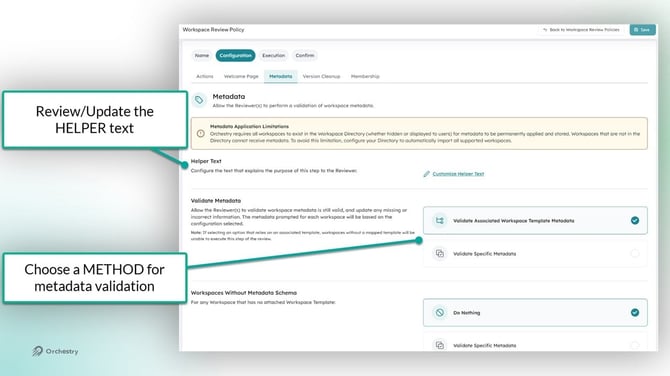
Workspace Review: Metadata Validation Step
"Better metadata. Better discoverability. Better governance."
A new step is now available in Workspace Reviews to capture missing or re-validate existing (Orchestry) metadata:
- Supports application of organizational
- This enables better reporting and a much more powerful Directory experience for users.
- Supports more accurate search, reporting, and naming compliance
- Makes it manageable and easy to delegate metadata upkeep to workspace owners
Update on Microsoft 365 Archive Support
This feature is now FULL AVAILABLE to all Orchestry customer tenants.
Want to learn more how to get started with M365 Archive in Orchestry?
Check out the article: Orchestry Updates for July 2025 | Part 2
Workspace Review: Improved Ownerless Handling
Workspaces with only disabled or service accounts as owners are now also flagged as ownerless.
- Prevents governance gaps when owners leave or accounts are deactivated (e.g. service accounts)
- Members can be prompted to promote themselves as new owners
- Ensure reviews are actioned when they would otherwise go un-answered.
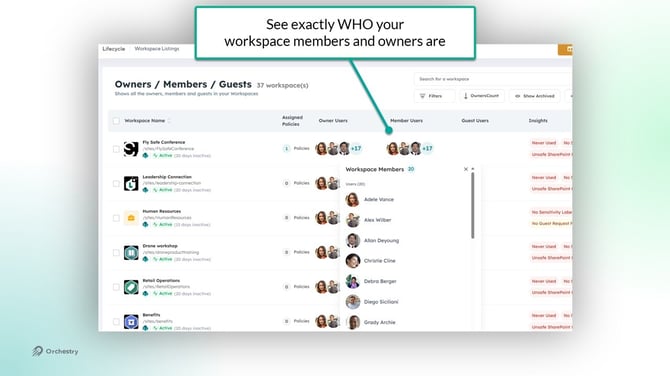
Workspace Membership Details
We’ve redesigned how workspace ownership is displayed.
- Updated workspace membership reporting to now expose all the users who currently have access via Owner, Member or Guest privileges. This will expand in the future as we include crawling of the SharePoint security groups.
- Cleaner, more consistent layout across Owners/Members/Guests listings
- Gives admins and analysts quick visibility into who’s accountable for each workspace
Reporting Enhancements
- Workspace Access filter now surfaces disabled accounts, helping admins spot and clean up inactive access
- Team Channel Sites report includes new columns (owners, members, guests, documents, storage) for richer visibility into usage and membership
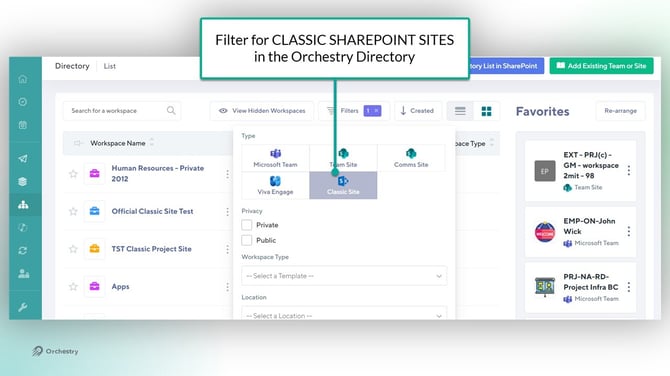
Directory & Health Check Enhancements
- Classic site filter makes it easier to identify and manage older site types in your tenant
- Health Checks now surface shared channel sites, giving you more complete visibility across all workspace types
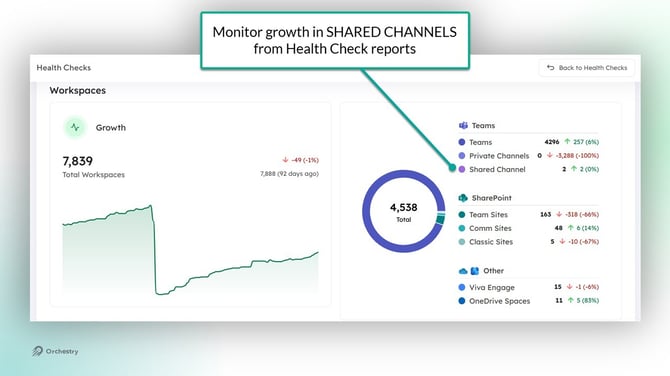
NOTE: Only Health Check reports created as of this release will include Shared Channels. Any reports created prior to this release will not be modified.
Bug Fixes
- We fixed errors that could interrupt Workspace Review tasks
- The “Shared With” filter in Sharing Links now works properly for Guests
- Workspace owners can once again edit metadata directly from the Team Information tab and Workspace Information web part