
This update does NOT require your intervention and does not involve any downtime.
Improvements
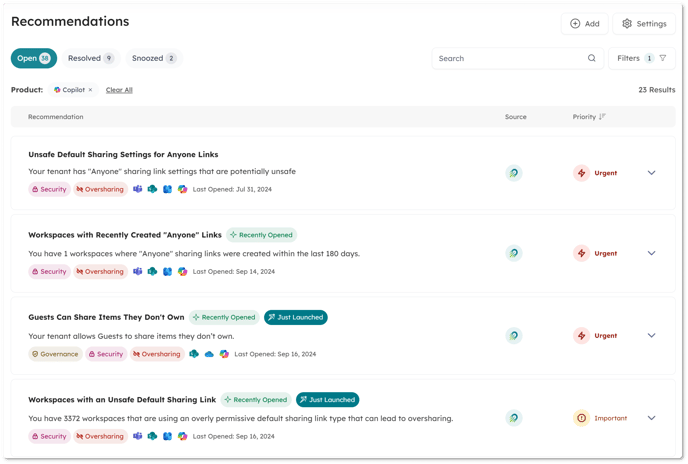
- Copilot Recommendations : We have added tags to a number of existing Orchestry Recommendations to include their relevancy to Copilot readiness. This brings the current total of powerful Copilot recommendations to 23. See below for definitions of these recommendations.
|
Recommendation |
Copilot Application |
|
Bloated Workspaces |
Copilot relies on accessing and processing data efficiently to provide relevant insights and suggestions. When the number of items exceeds a certain threshold, it introduces complexities that can affect how well Copilot can retrieve, analyze, and rank content. These workspaces also make for more difficulty managing information architecture and permissions, both of which can impact Copilot. |
|
Group Self Service Not Disabled |
Native M365 Group Self Service allows users to create workspaces without enforcing appropriate security and governance standards. These inevitably end up at greater risk for oversharing and other security issues that can impact Copilot. |
|
Guests Can Share Items They Don't Own |
Allowing Guests to share items they don’t own means external users are able to contribute to the oversharing problem without any means for Team Owners to effectively monitor this sharing. |
|
High Number of Private Channels |
Private Channels create silos of information that might be essential for Copilot to generate well-rounded responses or recommendations. If important data is fragmented across various private channels, Copilot may miss key pieces of information, leading to a lack of understanding of the bigger picture or providing incomplete assistance. |
|
Large Workspaces |
In very large sites, Copilot may struggle to determine the most relevant information because of the sheer volume of data. With more documents and files to evaluate, it can be harder to identify what’s most pertinent to the user’s query. This can lead to less accurate insights or suggestions, as Copilot might pull from outdated or less relevant content. Larger sites often tend to have more complex Information Architecture, further fragmenting data. |
|
Lifecycle Management is Not Enabled |
Orchestry’s Lifecycle Management policies help to ensure that only active and authoritative data is retained, and old or inactive workspaces have their data archived appropriately. Without this Orchestry feature enabled, this automation cannot be utilized. |
|
Never Used Workspace |
Never Used workspaces will often contain a few stray assets uploaded when it was created but were then abandoned. Copilot might mistakenly reference these locations when searching for information, which can clutter search results and reduce the accuracy and relevance of insights. |
|
No Container Level Sensitivity Labels Defined |
Without Sensitivity Labels, Copilot might encourage or facilitate oversharing in collaborative environments, such as Teams chats or shared documents, by suggesting or auto-completing information from a sensitive source. Sensitivity Labels defined in Purview and enabled in Orchestry Provisioning is a good practice to ensure that sensitive information is protected. |
|
Ownerless Workspaces with Recently Created Shared Links |
Workspaces that have sharing links created within the last 180 days, but who have no effective Owners or “stewards” to monitor and manage this sharing can often contribute to oversharing scenarios, which can lead to sensitivity information leaking in Copilot. |
|
Secure Score Drop |
The Secure Score reflects an overall assessment of a tenant’s security posture. A significant drop in scope may reflect a change in security configuration that could impact content discoverability and Copilot. |
|
Secure Score Low |
The Secure Score reflects an overall assessment of a tenant’s security posture. A low score indicates many best security best practices are not in place, which could impact content discoverability and Copilot. |
|
Unsafe Default Sharing Settings for Anyone Links |
Workspaces with Anyone links allow a direct pathway to content for external parties without requiring any kind of authentication and no means to track usage of said links. Furthermore, Anyone links can be forwarded to others, granting an unmanaged and expanding group of users access to your content. If it is deemed these links must be kept enabled, they should be configured with a restricted level of access, and time-bound, to ensure the links to this information have a limited lifetime. |
|
Workspaces that are Candidates for Archival |
One of the chief factors behind complaints about findability is that old, outdated content is not being archived and/or purged on a regular basis and still being considered for Copilot responses. This can have a major impact on the platform’s ability to distinguish good information from bad and lead to inaccurate or misleading responses. |
|
Workspaces with an Unsafe Default Sharing Link |
Unintentional oversharing can often happen due to quickly clicking through SharePoint or Teams sharing dialogues. When the Default Link is not set to a safe value like Users with Existing Access, unintentional oversharing via links can happen quickly. |
|
Workspaces with Bad Names |
Copilot relies on clear and organized data structures to provide relevant and accurate assistance. Poorly named or duplicate sites and teams can create a chaotic environment that affects Copilot’s ability to deliver useful insights, leading to potential issues with data retrieval, ambiguity, and oversharing. |
|
Workspaces with Low Membership |
Copilot uses collaborative data like chat histories, document edits, and task assignments to understand the team’s context and generate meaningful insights. Workspaces with low membership tend to have less of this all-important context, so Copilot might struggle to provide relevant responses when users ask for updates, summaries, or suggestions related to that Team. |
|
Workspaces with no Archival/Renewal Policies |
Orchestry’s Lifecycle Management policies help to ensure that only active and authoritative data is retained, and old or inactive workspaces have their data archived appropriately. |
|
Workspaces with no Container-level Sensitivity Labels Applied |
Without Sensitivity Labels, Copilot might encourage or facilitate oversharing in collaborative environments, such as Teams chats or shared documents, by suggesting, summarizing or auto-completing information from a sensitive source. |
|
Workspaces with no Content |
If a site or Team has no content, Copilot might try to retrieve data from other, unrelated locations to fulfill a user’s query. This can result in irrelevant or inaccurate suggestions, as Copilot may pull content that is not directly related to the user’s request. Such workspaces also often represent wasted processing power as Copilot scans empty spaces. |
|
Workspaces with no Conversations |
Copilot relies on signals like conversations, document usage, and interaction history to determine what content is most relevant to users. When a Team has no conversations, Copilot has fewer signals to base its relevancy ranking on, making it harder to determine which data should be prioritized. Furthermore, without conversations to assess, Copilot lacks critical context, making it more challenging to generate relevant responses or suggestions. |
|
Workspaces with Recently Created "Anyone" Links |
When "Anyone" links are created, anyone with the link can access the file or resource without needing to authenticate. This means that Copilot may reference or suggest content that is broadly accessible via these anonymous links, even if the original intent was to keep the information within a controlled group. |
|
Workspaces Without Members |
Teams without members generate no activity. Copilot relies on user-generated content—conversations, shared documents, tasks, and interactions—to provide insights, suggest actions, and support decision-making. Without members, there are no such interactions or content for Copilot to work with, leaving it with little to analyze or respond to. |
|
Workspaces Without Owners |
Workspace Owners serve a critical function in monitoring and governing the activity within their workspaces. This includes implementing the appropriate configuration of a Team or Site, as well as guiding Members to utilize best practices. Workspaces without Owners often lose this critical oversight and are much more likely to fall victim to oversharing scenarios and impact Copilot. |
- Guest Activity: We have moved away from using the Guest’s last Interactive Login to their Last Successful Login, which should improve accuracy in tracking Guest Activity in your tenant.
Bug Fixes
- Workspaces Excluded from Archival missing in reports – Fixed an issue where workspaces excluded from an archival are missing in reports.
- Live Template Excluded Fields Now Exclude Views: Fixed an issue where prohibited fields (e.g., _ExtendedDescription) were causing provisioning jobs to fail due to their inclusion in a custom View.