
More new features and updates are available in Orchestry for October, including new Insight reports and improvements to help you better understand your environment and its Workspaces.
Bug Fixes
- Workspace Archivals: Orchestry will fail gracefully if you try to assign a Group as owners as part of an archival and that group does not exist.
- Planner Provisioning: We have slowed Planner provisioning down so there are no longer errors.
- Groupless SharePoint sites no longer appear in the Workspace Directory: Previously, they would appear and disappear on a nightly basis. Now they will no longer appear.
Improvements
- Pending Approval Report: Addition of Owners, Members and Days Inactive fields to the report
- No Renewal | Archival Report: Addition of Owners, Members and Days Inactive fields to the report
- Owners | Members | Guests Report: Addition of Assigned Policies which is useful context.
- Dashboard: Large numbers (over three digits) now are formatted for easier reading and will respect a user's preferred format based on their locale (periods in French for example).
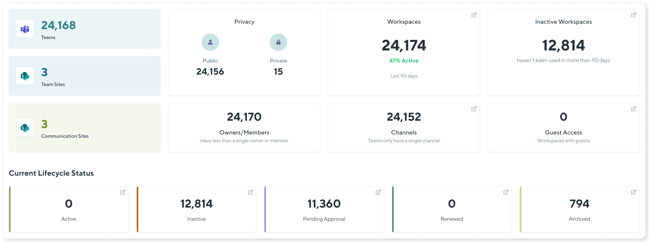
- Deleted and Restored Workspaces now appear correctly in Workspace Insights: Whether a Workspace is deleted via a native M365 means, or via an Orchestry Archival; when restored, the Workspace will be correctly interpreted by Orchestry and be fully editable once more.
- Workspace Directory: Will now better handle cases of Workspaces that have had their M365 Groups deleted, but the SharePoint site remains (e.g., due to a retention policy)
New Features
New Insight Report - Workspace Full Details
A new 'Master' report is now available for your Workspaces which includes every possible field. This is a great addition as the data can also be exported to Excel to perform custom analyses. The columns include:
- Workspace Name and Status
- Assigned Policies
- Workspace Type (Orchestry Template)
- Document Count
- Page Count
- List Item Count
- Group Conversations Count
- Channel Count
- Workspace Space Usage
- Owners Count
- Members Count
- Guests Count
- Days Inactive
- Plus any custom metadata you are capturing and have enabled in Insights
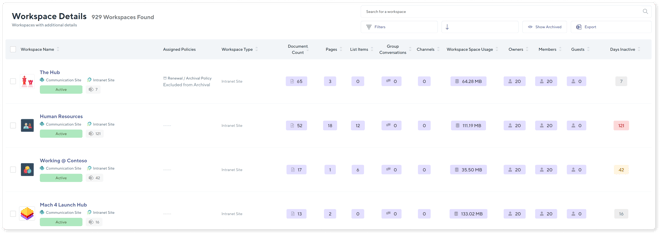
It's a wide one, so be careful and don't forget the Export function is there!
New Insight Report - Ownerless Workspaces
A new report is now available for your Workspaces so you can quickly tell which workspaces have no owners! This report includes the following information:
- Workspace Name and Status
- Assigned Policies
- Members Count
- Guests Count
- Document Count
- Page Count
- List Item Count
- Group Conversation Count
- Channel Count
- Workspace Space Usage
- Days Inactive
- Plus any custom metadata you are capturing and have enabled in Insights