
NOTE: This update does not require your intervention and does not involve any downtime.
Improvements
- Skip Provisioning Old Project Workspace Template during new Installs : New installs will no longer automatically provision the now deprecated "Project Management Template". For customers still seeing this (or using it) in their Workspace Templates list, we recommend removing it and using the much improved new templates available from the Orchestry template gallery.
- Added Provisioning 'Source' Logging : We now log and output the source of the provisioning request (WebApp, Teams App, API or Web Part).
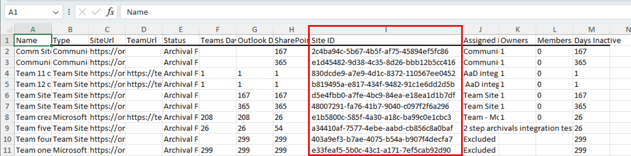
- Include Site ID as part of the Unsuccessful Archivals Report : As requested by a number of customers, the export of the Unsuccessful Archivals Report will now include the Site GUID - making it much easier to troubleshoot and for our help desk to assist you.
- Improved Logging of Export Teams Channel Posts during Archivals : Many teams contain system (hidden) messages buried in the Teams Channel Chat history (such as when a Member is added or removed) and these messages cannot be exported. Our logging will no longer indicate this as a failure but instead call out that it is 'skipping' such messages.
- Skip "SectionImages" Document Library : Anticipating (most likely) the upcoming support for background section images, some customers have seen a new Library appear called SectionImages. When Live Templating from one such site, the provisioning engine was unable to recreate this system library. We have added support for skipping this library. See Message MC724124.
- Added Support for Upcoming Teams Domain Changes : With the upcoming domain change for Teams in the web to https://teams.cloud.microsoft.com, Orchestry has been configured to continue working without interruption once this change rolls out.
Bug Fixes
- Re-Enabled Archival of Groupless or Compliance Blocked Workspaces : This past summer, we released the ability to force archivals to continue even on Workspaces typically excluded from policy enforcement due to their status. These include: Workspace that were Compliance (retention policy) Blocked from Deletion, and Workspaces that were Groupless (Sites orphaned from their group). See the original announcement here: Orchestry Updates for August 2023 : Orchestry Software.
This functionality has been re-introduced and is again available. How it works:- For Compliance Blocked Workspaces : You can remove the 'Exclude from Archivals' flag and force the workspace to Archive. Orchestry will still be unable to delete the SP Site (as it is held by the retention policy), will log a history message to this effect, but will proceed with concluding the archival - moving these workspaces to an "Archived" State.
- Note: It is highly recommended that you first remove compliance policies from workspaces you wish to archive, in order to allow Orchestry to to proceed unhindered.
- For Groupless Workspaces : You can remove the 'Exclude from Archivals' flag and force the workspace to Archive. Orchestry will now be able to delete the remaining orphaned SP Site and will proceed with concluding the archival - moving these workspaces to an "Archived" State.
-
- Added Additional Retries to Metadata Extraction during Archival : When List Metadata extraction is enabled during an archival policy, we will now re-attempt this process several times if this section sees an error while processing. We have also enabled this step to be skippable, if after multiple attempts the metadata cannot be extracted - allowing the rest of the archival to complete.
- Improved Performance for Metadata Extraction during Archival : Improved performance and resiliency for cases where huge document libraries contained a large volume of metadata.
- Added Additional Retries to Metadata Extraction during Archival : When List Metadata extraction is enabled during an archival policy, we will now re-attempt this process several times if this section sees an error while processing. We have also enabled this step to be skippable, if after multiple attempts the metadata cannot be extracted - allowing the rest of the archival to complete.
- For Compliance Blocked Workspaces : You can remove the 'Exclude from Archivals' flag and force the workspace to Archive. Orchestry will still be unable to delete the SP Site (as it is held by the retention policy), will log a history message to this effect, but will proceed with concluding the archival - moving these workspaces to an "Archived" State.