
This release has a ton of new improvements, features and capabilities for you to use. We hope that you love the new features and are just as excited as we are to try them out.
Overview
The March release of Orchestry is our largest yet with a host of new and powerful features. Stay tuned for more information but some important points:
- Orchestry Regions: Orchestry is now split into multiple regions including North America, Australia Pacific and Europe. The Orchestry infrastructure has also changed to introduce redundancy, failover and scalability.
- Orchestry Data Storage: Change in what is stored in Orchestry vs customer environments. Lots of content will now be stored in the customers environment for security and compliance regions (plus hey if we don't have to store data why should we :)
- Update to latest PnP Version: The version of PnP that Orchestry runs on has been updated to the latest versions of PnP.Core and PnP.Framework
- Workspace Directory Improvements: The Workspace directory will now show Workspace Template, Sensitivity Label and Classifications.
- Sensitivity and Classification Label Support: Orchestry now supports both Sensitivity Labels and Classification Labels in provisioning and control security, guest access and sharing settings.
- Group Options: Orchestry now provides the ability to control various group options during provisioning including Guest Access, Disabling welcome email and others.
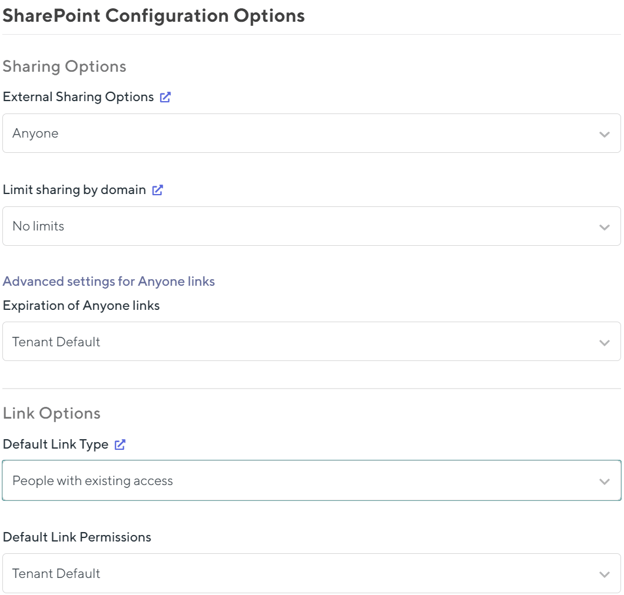
- Default SharePoint Site Sharing Options: Orchestry now provides the ability to control SharePoint site sharing options including the External Sharing Options, Default Link Type and Default Link Permissions
Orchestry Regions
Orchestry is now split into the following regions using the following data centers:
|
North America Region |
Azure Data Centers: US Central and US East 2 |
|
European Region |
Azure Data Centers: Europe North and Europe West |
|
Australia Pacific Region |
Azure Data Centers: Australia East and Australia South East |
This means a few things for you to note:
- Increased Scalability and Performance: Since we not have local data centers customers that are using Orchestry in APAC and Europe will see significant performance improvements as they are accessing a data center closer to their location instead of our US Data center.
- Data Sovereignty: European and Australian customers will have data stored in those regions.
- No downtime: We have built a system where we can upgrade environments with no downtime to users using a bunch of great Azure functionality.
Orchestry Data Storage
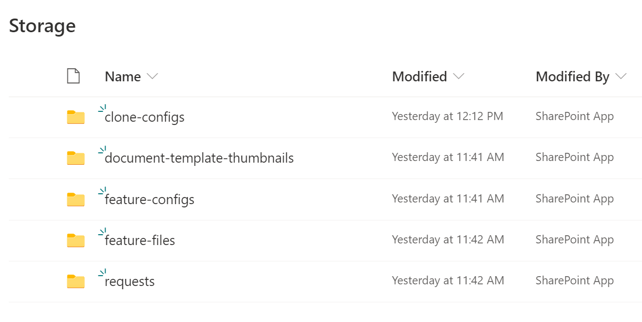
We have made changes to how Orchestry stores data. You will see a new library called "Storage" provisioned as part of the upgrade into the Orchestry Site Collection. This will now store the following which used to be stored by Orchestry in our Azure instance:
- Document Template Thumbnails: As described these are the thumbnails for the document templates in Orchestry. You can also over write these with your own custom icons if you like
- Feature Configurations: Any PnP files related to features
- Requests: This is the largest change but now all the log files and thumbnails associated with a request is stored here! This implies that logs can be kept indefinitely.
- PnP Files: Any custom PnP files are not stored in this library
What does all this mean? Better security and scalability since Orchestry stores less data than ever before and its all available to you to manage in a way that you see fit :)
Orchestry uses the latest version of Microsoft's PnP Framework
We have now updated Orchestry to the latest and greatest PnP version plus added a few of our own fixes. This means that some things have been fixed (like provisioning Microsoft Lists correctly) but it should result in better support and new features. The current version we are now using is:
- PnP.Core - 0.5.25-beta2
- PnP.Framework - 1.1.0.0 (with a ton of custom fixes from Orchestry)
Workspace Directory Improvements
Our Workspace Directory is also getting some improvements in this release including:
- Workspace Type Filter: Now users can filter by the type of Workspace that was used during the request. This has been often asked for and now it is so!
- Sensitivity Label Filter: Users can filter on the Sensitivity Label that is applied to the Workspace
- Classification Filter: Users can filter on the classification label applied to the Workspace.
Sensitivity and Classification Label Support
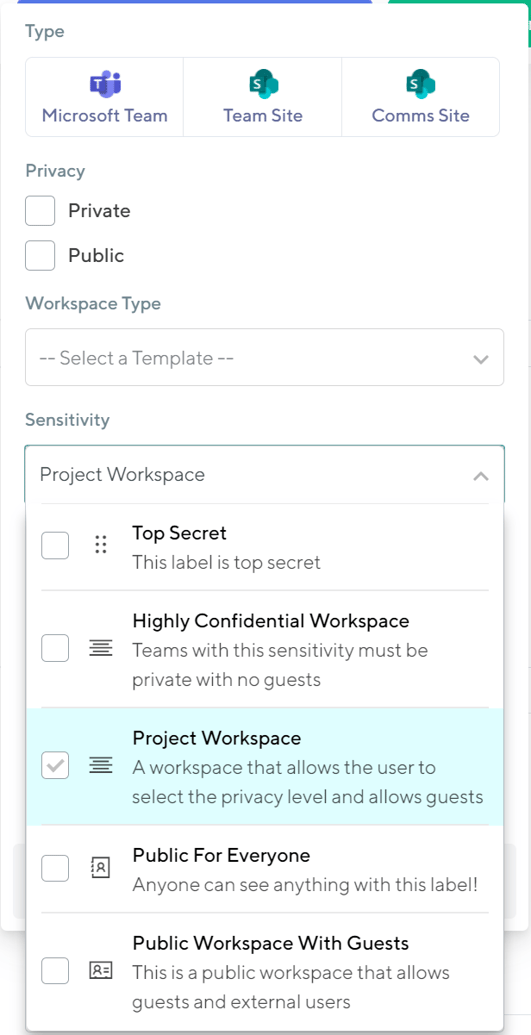
This is a huge set of new features to be able to provide support for Sensitivity Labels in Orchestry! This includes the following features:
- Full support for Container based Sensitivity Labels in Orchestry
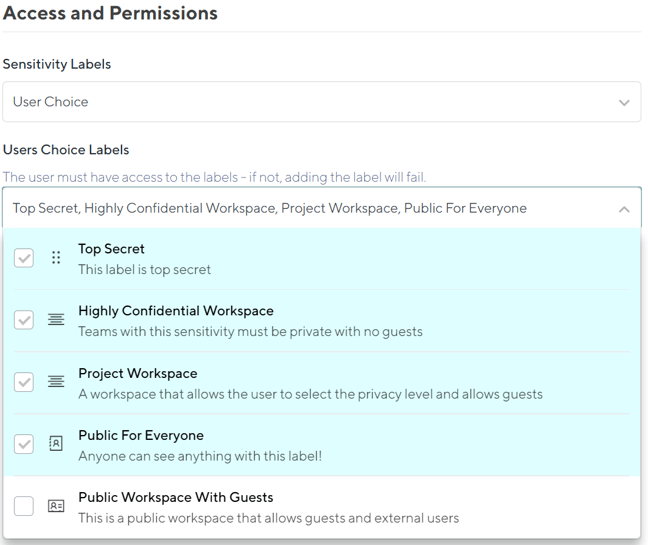
- Sensitivity Labels can be enforced for a Workspace template or you can allow users to choose from a subset of Sensitivity Labels for a Workspace (this is something that M365 doesn't provide and is a great feature of Orchestry)
- The admin interface understands that if you use Sensitivity Labels which parts of the options will be effected
- Once Workspaces are created we will apply the sensitivity labels for all things provisioned through Orchestry including Teams, Team Sites and Communication sites.
For more information on Sensitivity and Classification labels please see the following articles.
Microsoft Group Options
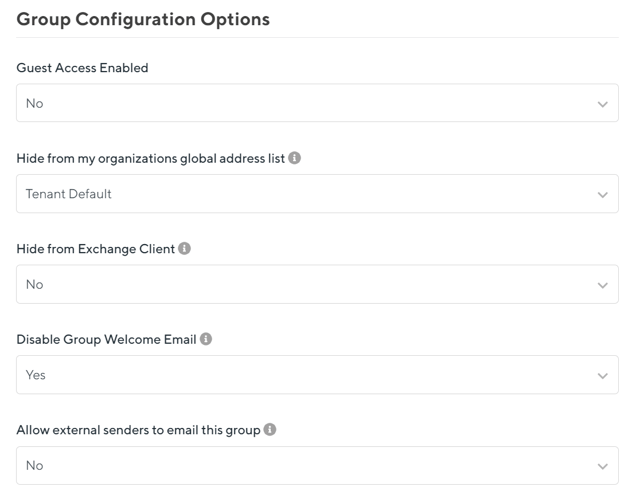
This is unique feature to Orchestry but again highly requested. You can now control various group options on a Workspace template level including:
- Guest Access: Workspaces can control guest access on a per template basis!
- Hide from the GAL: Ability to hide the Workspace from the Global Address List. No more having 10000 teams when entering in an email
- Hide from exchange client: Ability to hide the Workspace in Exchange so you don't clutter it up for users
- Disable Welcome Email: Hate the default email that M365 sends when provisioning a group? Now you can turn this off and maybe use a webhook to send a beautiful custom email instead
- Allow External users to email this group: Another useful option to better control groups and emails.
We believe that these options provide an amazing level of control for your environments and can't wait to see what you do with them!
Default SharePoint Site Sharing Options
Another huge piece of functionality but now you can control the default SharePoint site sharing options on a template by template basis. This is a new and very powerful functionality that will allow you to control the following:
- External Sharing Options: Control how the SharePoint site can be shared by setting the option to Anyone, New and Existing Guests, Existing Guests or Only People in your organization.
- Anyone Links Expiration: For anyone links you can control domains available or blocked and expiration
- Default Link Type: Control the default link type that is presented to users when they try to share a piece of content. You can choose from the Tenant Default, People with existing access, Specific People, Only People in your organization or Anyone with the link.
- Default Link Permissions: Control the default link permission from tenant default, view or edit
These options are once again a huge part of governance for both Teams and SharePoint and offer you some creative and interesting possibilities.
We think that this is biggest and best release of Orchestry yet. Stay tuned for more news about this release coming soon and as always let the team know if you have any questions. Thanks again for being part of the Orchestry journey with us.