
New Features
Bulk Reset Workspaces
We are very excited to be announce we've rolled out bulk support for the ability. In doing so, we've also made the feature much more accessible by placing it in line with existing Lifecycle bulk actions (from the toolbar in Workspace Insights).
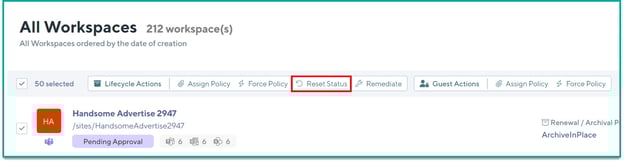
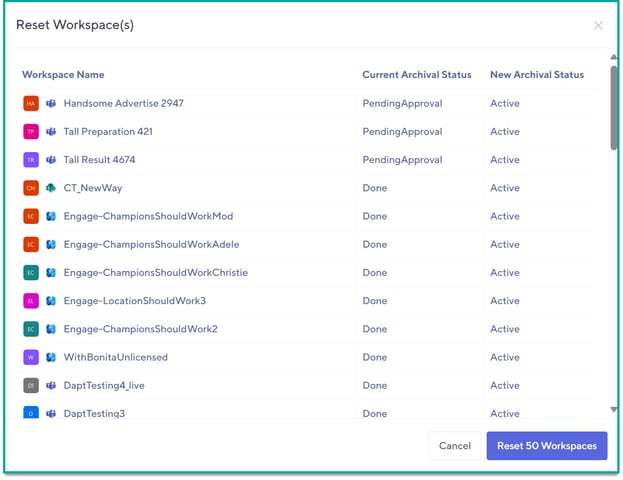
The bulk reset tool will continue to work as it had for individual workspaces:
- Will only reset Failed, Pending Approval, Renewed, or Archived statuses
- Will not work for Active/Inactive
In cases where the Workspace has been toggled as part of a bulk select, but cannot be reset, the tool will intelligently flag that these rows cannot be reset and the count in the reset confirmation will reflect that. The tool will also give you a preview (for reassurance) of what the new status will become once the reset is complete.
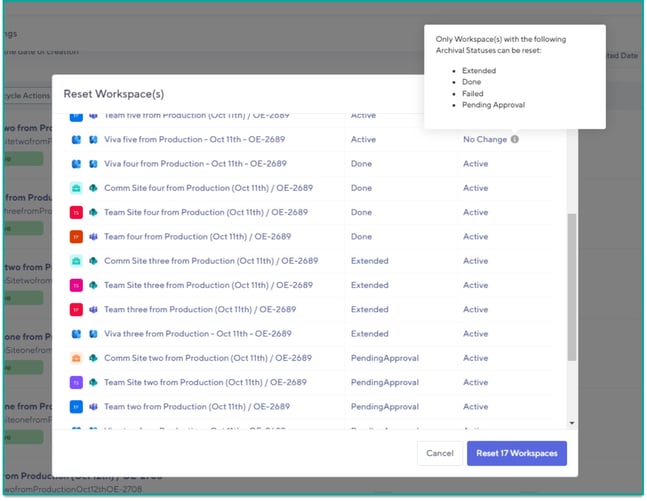
The bulk reset tool can be performed on a maximum of 200 items at a time (based on the maximum page size) but keep in mind that the more items are selected, the longer the processing may take.
Improvements
- Added support in Archival policies to intelligently check if a Site is already in Read Only mode, or a Team is in Archived mode (in the Teams Admin Center) before attempting to perform archival operations on these. If this is encountered, the archival will skip any problematic steps and record this in the logging.
- Added support to intelligently flag when New permissions are being requested by the Orchestry App or Orchestry Service App. This will compare the permissions from your last consent with the current schema and help flag changes that you may want to look at more closely.

Bug Fixes
- Improved History Logging during a Forced Archival to omit including a reference to the archival being performed due to inactivity.
- Improved error logging
What's coming soon?
Stay tuned for the release of our new Workspace Templates as well as the new Archival API!