
Lots of great new features for Orchestry have been released in our 2020 build. Please take a look at the list below and if you have any questions get in touch or reach out to one of our many wonderful Orchestry partners.
Managed Metadata Support
Orchestry now allows you to use Managed Metadata for end user requests using the Workspace Request Wizard.
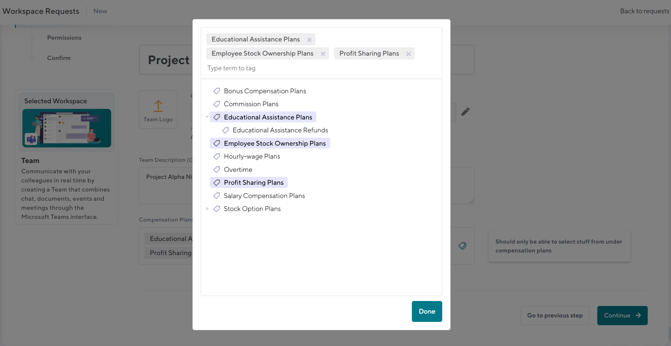
As well as in the Workspace Directory for Filtering:
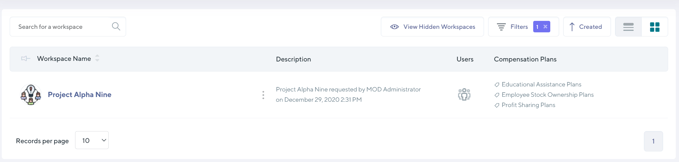
This provides you with a huge amount of flexibility to use any pre-defined metadata that you have as part of your organization as well as being able to provide a hierarchy of terms.
Administrator Request Editing and More
A common ask has been for the ability for administrator to be able to edit a request before provisioning. Orchestry now provides the ability for Orchestry administrators to change the Workspace Name, URL, Privacy and Users before approving a request. No more having to cancel a request if a user made a mistake during the provisioning process!
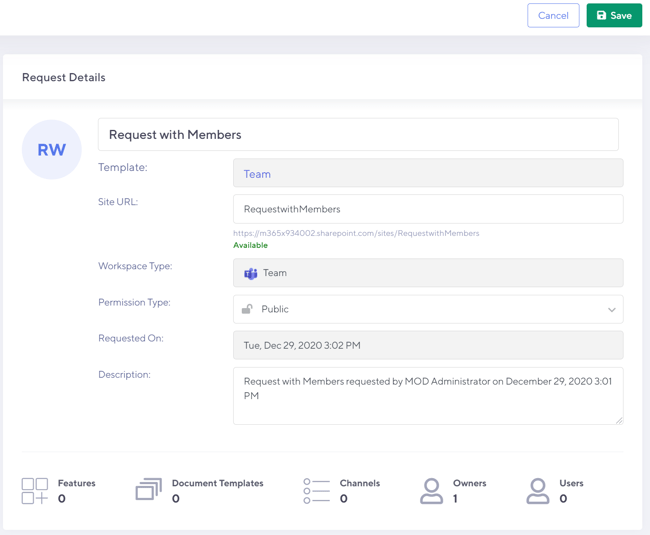
In addition we have now added the capability to edit failed requests as well as being able to send a rejected request through the Workspace approval process. Some great changes that will help with streamlining the creation of requests.
Workspace Directory
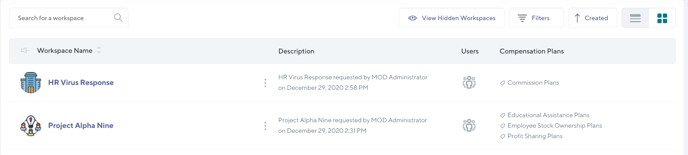
The Workspace Directory now supports managed metadata as well as the ability to remove the favorites feature for more room to show columns in the directory.
Group and SharePoint Site Logos
Microsoft recently made a change that stopped the automatic synchronization of Group logos to SharePoint sites which was disappointing. Never fear though as in Orchestry we have now created this functionality so that any Group or Team logos are automatically applied to the underlying SharePoint Site
Installation Page
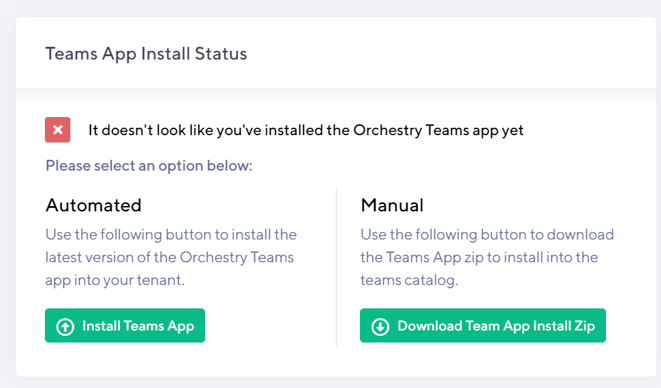
A new item on the Orchestry installation page is for the Teams Application that comes with Orchestry. This will help you know if you are running the latest version of the product for all three components that Orchestry provides: Teams Application, Azure Application and SPFx Web Parts.
General Bug Fixes
Some other general bug fixes including:
- Fixed bug where pressing enter when choosing an owner or member in the Permissions screen of the Workspace Request Wizard would cause Orchestry to explode
- Issues with Private Channel provisioning have been fixed
- Updated permissions documentation and now ask for permissions to be able to upload a Team App on behalf of a user
- Validation on required fields is handled better
- Input boxes on naming policies are now clearer to see
- Channel settings for 'Show For Members' are now copied over in the new template
- Recommendation on optimal image size for Workspace template images
Other Detailed Changes
Workspace Requests
- Re-approvals after failure/rejection of a request
- Editing of Workspace requests can be done by Orchestry Administrators before the request is provision
- Any edits of requests are noted in the history of the request for compliance
Directory
- Ability to hide the Workspace Favorites for more room
- Support for Managed Metadata in columns and views
- Support to choose Managed Metadata as a filter
- Orchestry Admins are now properly synced with Orchestry Site collection admins. Will update users when new admins are added to Orchestry.
- Added back button to Directory List on Directory page in Orchestry.
Installation/Maintenance
- Added Teams App installed status into the installation screen
- Button Push Teams App installer for customers that want to upgrade the Teams App separately
- Manual install zip download option available
Metadata
- Provisioning Metadata fields now with better Internal Names (No spaces)
- Metadata name validation to make sure no two fields are named the same.
- Validated against Orchestry Metadata names and Directory List Column names.
- Managed Metadata
- Managed Metadata Picker
- Directory Filtering
- Directory Columns
- Added Status of mapped column to Metadata list in Orchestry
Provisioning
- Always try to add logo to SharePoint site for groups since Microsoft doesn't do this anymore
- Fixed duplicate channel bug
- Auto add channels as favorites up to a max of 10.
Web Parts
- People Listing
- Fixed looked up by email to account.
- Fixed blank email problems.
- Better support for guests.
- Profile picture caching for guests to see images.
Permissions
- Added new "Manage Teams Apps for all users" permission.
- Used to install and update the Orchestry App in Microsoft Teams.
- Added missing permission descriptions to permission grant page.
- Fixed bug with API authentication for admins.
Other
- You can now log out of Orchestry without needing to log out of Azure AD and your browsers and other magic tricks
- Improved Group Search by Name in the administration center
Update Required
You will see that when you log into Orchestry that an upgrade is required. Please go through the process and this will be handled automatically for you.