Orchestry allows admins to manage different user roles within the platform. The scope of these roles will depend on the Orchestry subscription plan.
Interested in learning more about Orchestry Enterprise plan features?
Learn more: Orchestry Pricing & Plans
Orchestry Roles Overview
The following roles are available for Starter and Professional Plan subscriptions:
|
ROLE |
SCOPE |
NOTES |
|---|---|---|
|
Platform Admin |
Full platform access |
Tenant Global Admin always has this implicitly. Can also be explicitly assigned to users. |
|
Health Check Viewer |
Health Checks (read-only) |
Users only (no group support). Cannot action recommendations or edit annotations. |
|
Health Check Reviewer |
Health Check review workflow |
Only visible when Review Process = Self-Led. Configured in Settings > Health Check. |
|
Workspace Default Approver |
Approval workflow |
Receives approval requests. Not a page-access role. Users only (no group support). |
|
Workspace Requests |
Provisioning access |
Controls who can submit workspace requests. Groups only (no individual users). If empty, all users can request. |
|
Partner Hub Admin |
Partner Tools |
Only visible on Partner Hub tenants. Users only (no group support). |
|
Partner Manager |
Partner tenant management |
Only visible on Partner Hub tenants. Configured in Partner Tools settings. |
For Enterprise subscribers, role-based access controls are available in addition to everything available in Starter and Professional plans.
|
ROLE |
SCOPE |
SUPPORTS GROUPS |
|---|---|---|
|
Templates Admin |
Templates section + Templates settings |
Yes |
|
Workspaces Admin |
Workspaces section + Copilot + Workspace settings |
Yes |
|
OneDrive Admin |
OneDrive section + OneDrive settings |
Yes |
|
Guests Admin |
Guests section + Guest settings |
Yes |
|
Licenses Admin |
Licenses section + License settings |
Yes |
The Access Control Page
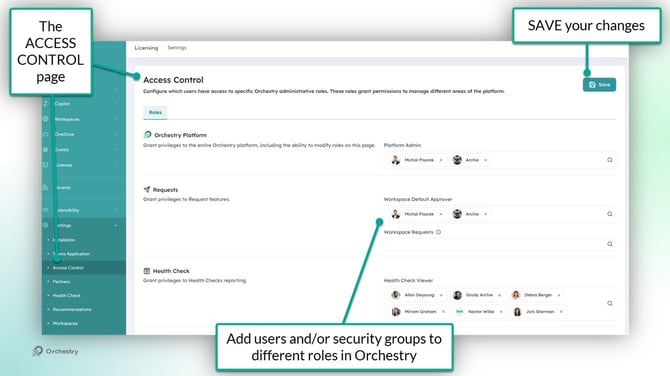
The 'Access Control' page (Settings > Access Control) provides admins a comprehensive location to manage all user roles in Orchestry.
The role options available on this page will depend on your Orchestry subscription.
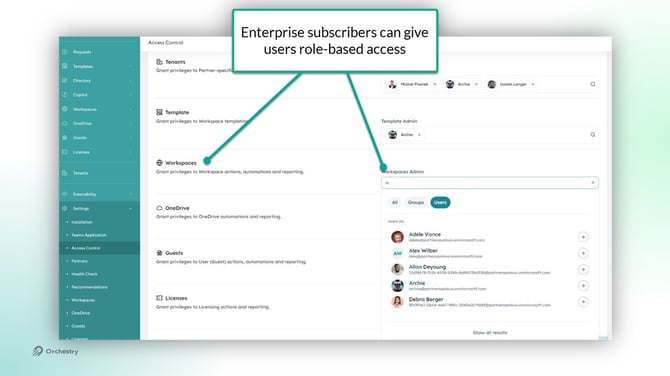
Role-Based Access (Enterprise Only)
For Enterprise subscriptions, admins can be divided into more granular roles to ensure people only have access to the areas of Orchestry they need.
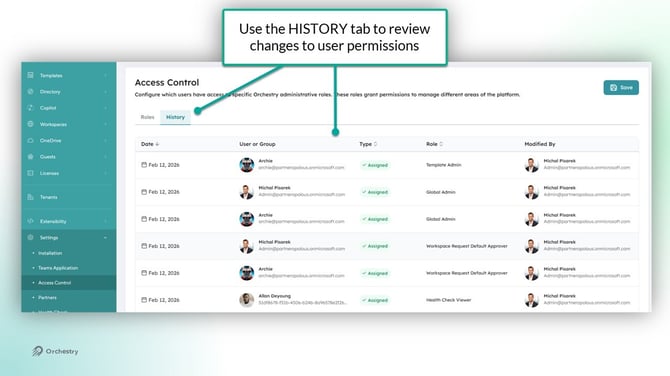
The History Tab (Enterprise Only)
The history tab provides a report of roles changes over time for review and auditing purposes