
Enterprise subscribers can access Orchestry's License Management features, enabling admins to:
-
Ensure the right licenses are assigned to the right users
-
Identify Microsoft 365 Copilot license assignments and total cost
Interested in learning more about Orchestry Enterprise plan features?
Learn more: Orchestry Pricing & Plans
The License Management Dashboard
The Licensing Dashboard (Licenses > Dashboard) surfaces highlights of license distribution, total costs, savings opportunities and more.
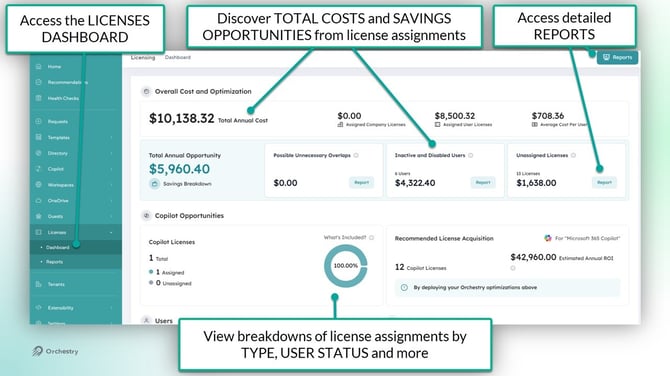
TIP: Go to the License Settings page (Settings > Licenses) to customize (1) the TYPE of licenses that are shown on the dashboard and (2) the license costs.
The Licensing Overview Page
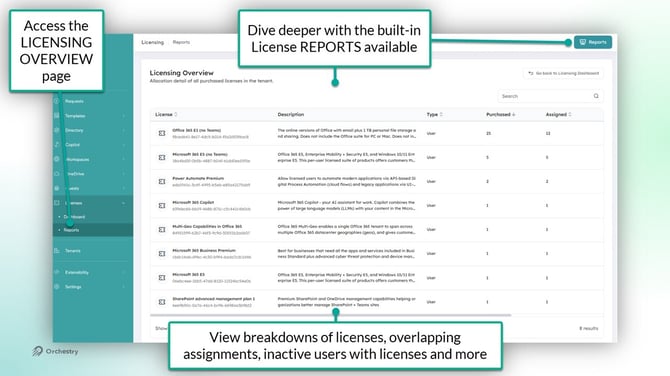
The License Overview page (License > Reports) allows admins to analyze:
- all M365 licenses they've have by NAME and TYPE
- the number of licenses they've purchased, and
- the number of their ASSIGNED licenses
License Management Settings Page
From the settings page (Settings > Licenses), admins can:
-
manage what licenses appear on the dashboard and
-
update the monthly cost-per-unit to ensure estimated costs and savings are as accurate as possible.
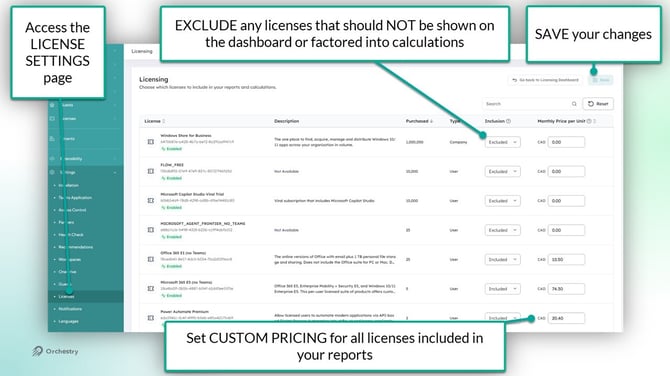
Note that the CURRENCY TYPE is based on the tenant region and cannot be changed manually.
How to Configure Licensing for the First Time
From the Licensing Settings page:
-
Identify any licenses that should be EXCLUDED from your reports and dashboards, such as 'Company' types with thousands of 'free' units
-
Set the monthly price-per-unit for each INCLUDED license
-
SAVE your changes