
Existing Orchestry customers are required to perform an application update and consent to a new Entra application in order to benefit from new features. Please read the following information carefully and reach out if you have any questions.
Overview
As Orchestry continues to expand its feature set, customers are increasingly demanding more granular insights into their Microsoft 365 environments—far beyond what is possible at the workspace level.
To meet these demands, we've developed a new Orchestry Content App, purpose-built to scan and analyze content down to the individual item level. This new application is essential for enabling deep-dive reporting capabilities that go beyond the surface of workspaces, uncovering detailed permission, sharing, and inheritance data across Teams, SharePoint Sites, and more.
Why a New App is Required
The scope and scale of modern Microsoft 365 environments present significant technical challenges. Many tenants contain many millions of objects (files and folders) spread across a vast array of Teams and SharePoint sites.
Scanning, analyzing, and keeping this data updated is a resource-intensive task. By offloading this operation from the existing Orchestry Service app to a dedicated Content app, we can optimize the retrieval of data from Microsoft APIs.
What the Orchestry Content App Does
The new app is dedicated exclusively to:
- Deep scanning of all Teams and SharePoint Sites across a tenant
- Extracting metadata from all files, folders, and nested objects
- Indexing this data to enable advanced analytics and insights
How It Works
Once installed and granted consent by a Global Administrator (GA), the Orchestry Content App:
- Authenticates securely with Microsoft APIs using app-only permissions.
- Systematically crawls each Team and Site collection in the tenant.
- Retrieves and processes metadata about each item—without ever accessing or storing file content.
- Feeds structured data into Orchestry’s analysis engine to generate detailed reports and dashboards.
Why This Matters to You
The app enables Orchestry to deliver data confidence at scale. Without installing the Content App several new and upcoming reporting features will not be available such as Sharing Link Analysis, Broken Inheritance Detection, and Advanced Access Reviews.
Action Required
To activate the Orchestry Content App:
- A user with Global Administrator privileges must sign into the Orchestry Admin Portal.
- Initiate the installation process under Settings > Installation.
- Consent to the required permissions (see below).
NOTE: the initial scan by the Content app can take several days to complete, depending on the size of your tenant.
FAQs
Why do we need a new app at all?
This new app is designed to integrate seamlessly with the existing Service App, to extend the depth of analysis down to the item level and feed this data back into the Orchestry engine for analysis and reporting.
How long will it take to see data scanned by the Content app?
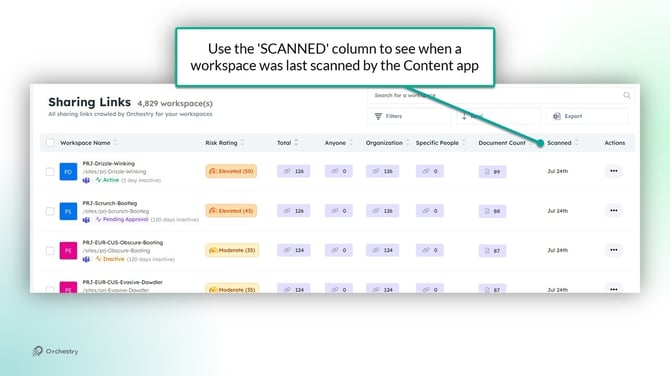
The initial scan of the Content app may take several days to completely review all of your workspaces. You can monitor which workspaces have been scanned using the 'Sharing Links' report:
What permissions does the Content app require?
The Content App uses six app-only Microsoft Graph API permissions. Importantly, these permissions do not introduce additional access privileges beyond the Service app. They simply need to be re-consented in the new application.
|
Permissions |
API |
Description |
|
Read and write directory data |
Microsoft Graph |
Used to read information about users, memberships, groups and teams |
|
Read and write items in all site collections |
Microsoft Graph |
Used to retrieve file and folder metadata and |
|
Sign in and read user profile User.Read |
Microsoft Graph |
Required for every app. |
|
Read all users' full profiles User.Read.All |
Microsoft Graph |
Used to populate identity-related sharing metadata for files and folders. |
|
Read activity data for your organization |
Office365 Management |
Used to retrieve recent audit log activities related to populate file and sharing reporting. |
|
Have full control of all site collections |
SharePoint |
Used in conjunction with Sites.ReadAll to update metadata or permissions on folder and files. |
Does this app read or store file contents?
No. The Content app reads metadata only—such as file names, paths, sizes, timestamps, and permission structures. No file content is accessed, indexed, or stored.
Who can install the app?
Only a Global Administrator (GA) can install and grant consent to the required permissions. Once installed, the app operates in the background and does not require user interaction.
What happens if we don’t install it?
Without the app, your existing Orchestry functionality will continue to function as usual. However, new features dependent on this functionality will be unavailable.