
Overview
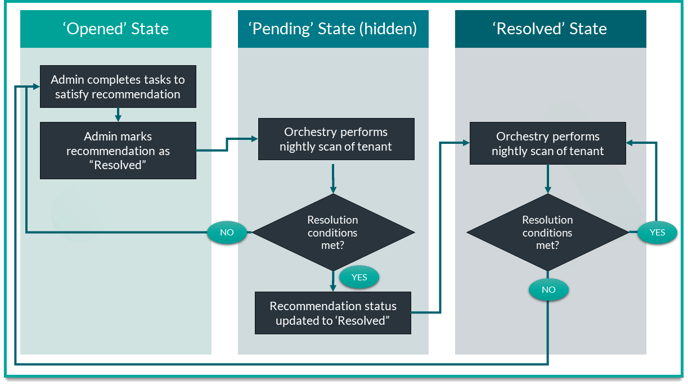
Recommendations have multiple states. Some are visible to Orchestry administrators, and some are not. For example, there is a 'pending' state that is NOT visible to users.
This article will teach you how to resolve recommendations in Orchestry, and what happens next.
Step #1: Complete the Recommendation Requirements
Each recommendation is different. Before you can resolve a recommendation, you must make the necessary changes to your M365 tenant and/or workspaces.
To learn how to resolve a particular requirement:
- Go to the 'Opened' tab
- Select a requirement to open it up
- Click 'View Details' to view a list of (1) recommended actions, (2) reasons why it's important, and (3) resources to get you started.
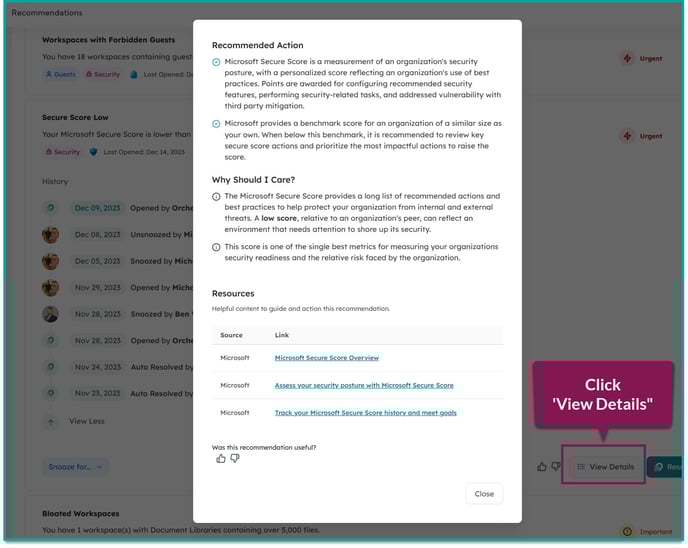
Once you've completed the work necessary to close the recommendation, proceed below.
Step #2: Resolve the Recommendation
There are two ways to resolve a recommendations:
- Manually resolving a recommendation
- Letting Orchestry automatically resolve them for you
Manually Resolve a Recommendation:
- Go to the 'Opened' tab
- Select the requirement to open it up
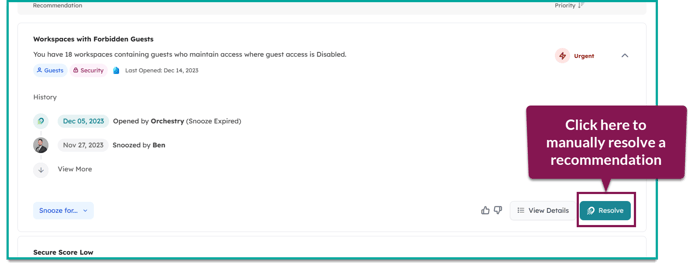
- Click 'Resolve"
This will move the recommendation to the (hidden) 'Pending' state where it will await the next overnight scan by Orchestry. You will NOT be able to see the recommendation again until after the next overnight scan.
Automatically Resolve a Recommendation:
No action required. Let Orchestry update the recommendation during an overnight scan.
Regardless of whether you manually close recommendations or let the system automatically close them for you overnight - the outcome will be the same. There is no advantage to either method, so you can choose the one you prefer.
Step #3: Verify Recommendation is Closed
After the next overnight scan, check Orchestry to verify whether or not the recommendation closed as expected.
- If Orchestry determines that all conditions have been met, it will move the recommendation to the "Resolved" state
- If Orchestry determines that NOT all conditions have been met, it will move the recommendation to the 'Opened' state.
Any 'resolved' recommendations will continue to be validated during every overnight scan. If your M365 environment changes and a recommendation no longer meets the requirements for closure, it will be re-opened.