
NOTE: Disabling the creation of workspaces in Microsoft 365 is optional, but highly recommended as part of your Orchestry setup. Microsoft 365 administrators can continue to provision these objects via the Microsoft 365 admin center.
Once Orchestry is in place, many organizations will choose to disable native Microsoft self-service creation processes to ensure the Orchestry platform is the single point of provisioning for end users.
This helps to avoid confusion and simplify communication plans, streamlines adoption of the platform, and helps to ensure consistency in workspace creation and management going forward.
Disabling Native Self Service Creation for End Users in SharePoint
See the article Manage Site Creation in SharePoint for the steps to disable site creation outside of the admin portal. Users with the SharePoint admin role will still be able to use this portal to create sites manually.
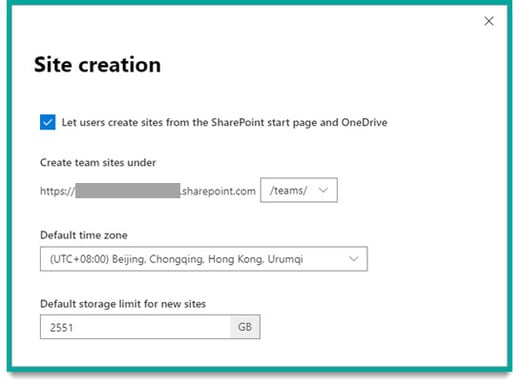
NOTE: This does not automatically restrict users ability to create Microsoft 365 groups (like a Microsoft Team). When a M365 group is created, a SharePoint team site will get created as well.
Disabling Native Self Service Creation for Microsoft 365 Groups
See the article Manage Who Can Create Microsoft 365 Groups | Microsoft Learn for the steps to disable self-creation.
Teams creation is governed by Microsoft 365 Group creation as a whole. In other words, to disable native self-service creation of team workspaces, you have to disable all M365 group creation, and everything that entails, such as:
- Outlook group inbox and calendar
- SharePoint Team sites
- Viva Engage communities
- Microsoft Teams
- Microsoft Planner
NOTE: If you don't already have an AD group for these admin users, don't skip that step. Keep in mind that users with certain roles will still be able to create Groups regardless.