
NOTE: These articles are intended to showcase examples of Orchestry's Custom Feature option. From a product support standpoint, we do not assist in creating or debugging Custom Features.
Getting Started
Before creating a custom feature, check out our introductory articles on:
About this Custom Feature
Need to ensure end users cannot delete content from a SharePoint site? Use this custom feature to add new permission types that you can assign to your site members.
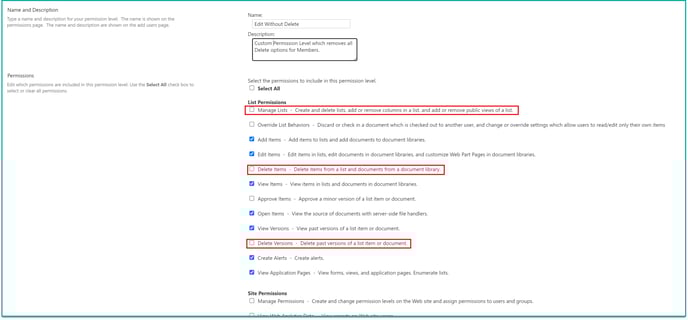
By assigning this custom feature to any existing SharePoint site, you can assign a new permission level "Edit Without Delete".

The new 'Edit without Delete" permission type is configured to prevent users from managing site lists, deleting files and file version history.
Adding the Custom Feature to Orchestry
To add this custom feature to your environment, copy the sample code and the end of the article and save it as a XML file.
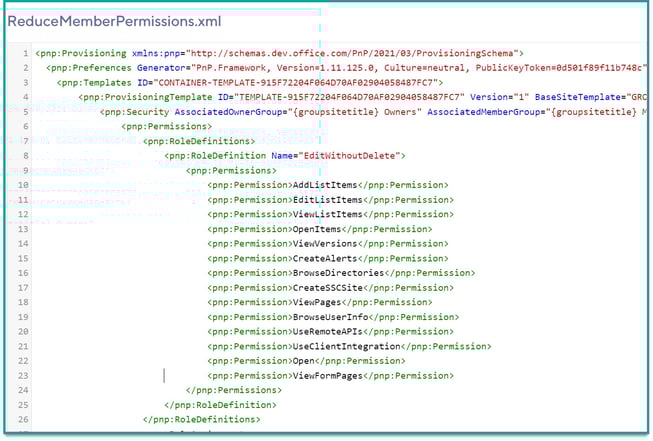
Next, upload only the XML into the Orchestry Template Files.
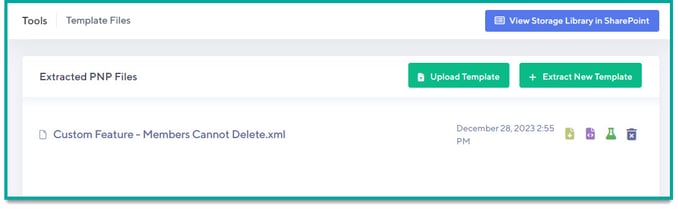
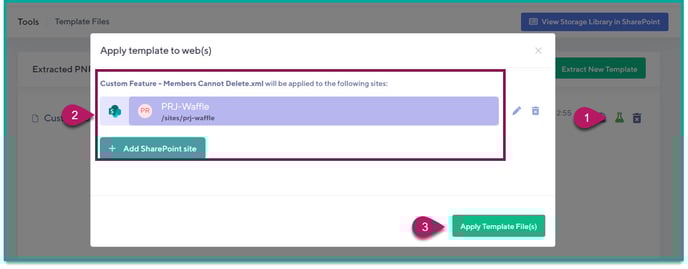
Next, to distribute the new feature to existing SharePoint sites:
- Click the 'Test and Apply' button
- In the 'Apply template to web(s)' window, add any SharePoint sites that require the new permission setting
- Click 'Apply Template File(s)' to provision the new feature
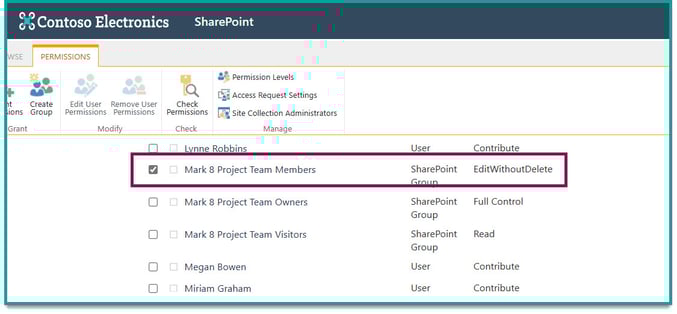
After the provisioning is completed, visit the targeted site(s) and verify that the 'Members' group has been updated to the new 'EditWithoutDelete' permission type.
Sample XML Code
Copy this code into a .XML file and upload the file as a template in Orchestry:
<pnp:Provisioning xmlns:pnp="http://schemas.dev.office.com/PnP/2021/03/ProvisioningSchema">
  <pnp:Preferences Generator="PnP.Framework, Version=1.11.125.0, Culture=neutral, PublicKeyToken=0d501f89f11b748c" />
    <pnp:Templates ID="CONTAINER-TEMPLATE-915F72204F064D70AF02904058487FC7">
        <pnp:ProvisioningTemplate ID="TEMPLATE-915F72204F064D70AF02904058487FC7" Version="1" BaseSiteTemplate="GROUP#0" Scope="RootSite">
            <pnp:Security AssociatedOwnerGroup="{groupsitetitle} Owners" AssociatedMemberGroup="{groupsitetitle} Members" AssociatedVisitorGroup="{groupsitetitle} Visitors">
                <pnp:Permissions>
                    <pnp:RoleDefinitions>
                        <pnp:RoleDefinition Name="EditWithoutDelete">
                            <pnp:Permissions>
                                <pnp:Permission>AddListItems</pnp:Permission>
                                <pnp:Permission>EditListItems</pnp:Permission>
                                <pnp:Permission>ViewListItems</pnp:Permission>
                                <pnp:Permission>OpenItems</pnp:Permission>
                                <pnp:Permission>ViewVersions</pnp:Permission>
                                <pnp:Permission>CreateAlerts</pnp:Permission>
                                <pnp:Permission>BrowseDirectories</pnp:Permission>
                                <pnp:Permission>CreateSSCSite</pnp:Permission>
                                <pnp:Permission>ViewPages</pnp:Permission>
                                <pnp:Permission>BrowseUserInfo</pnp:Permission>
                                <pnp:Permission>UseRemoteAPIs</pnp:Permission>
                                <pnp:Permission>UseClientIntegration</pnp:Permission>
                                <pnp:Permission>Open</pnp:Permission>
                                <pnp:Permission>ViewFormPages</pnp:Permission>
                            </pnp:Permissions>
                        </pnp:RoleDefinition>
                    </pnp:RoleDefinitions>
                    <pnp:RoleAssignments>
                        <pnp:RoleAssignment Principal="{groupsitetitle} Members" RoleDefinition="{roledefinition:Editor}" Remove="true"/>
                        <pnp:RoleAssignment Principal="{groupsitetitle} Members" RoleDefinition="EditWithoutDelete"/>
                    </pnp:RoleAssignments>
                </pnp:Permissions>
            </pnp:Security>
        </pnp:ProvisioningTemplate>
    </pnp:Templates>
</pnp:Provisioning>