
You can configure Teams workspace templates to include a set of channels during provisioning. This can help standardize the look and feel of workspaces, such as project teams.
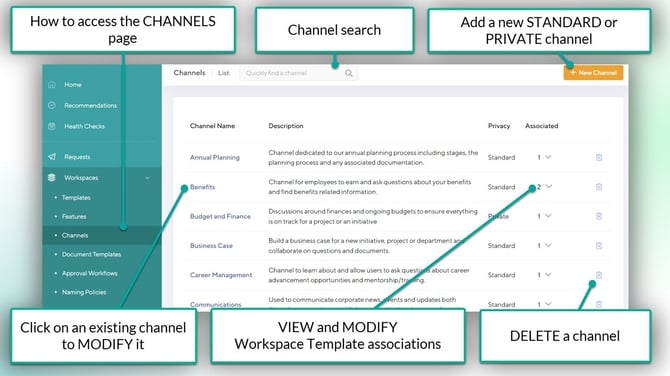
Channels can be created and managed from the 'Channels' page in Orchestry.
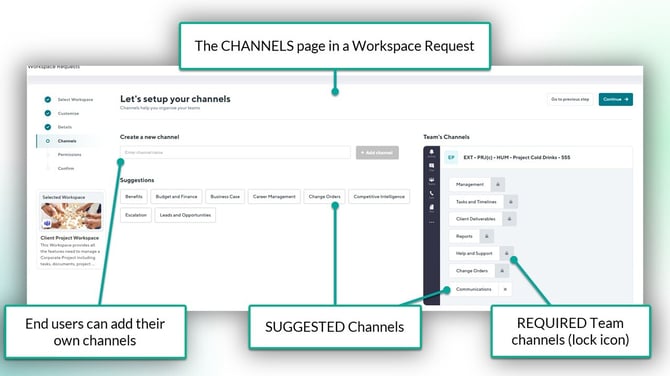
The End User Experience: Channels in a Workspace Request
Orchestry admins can include a set of channels as part of the workspace template. These channels will appear as either REQUIRED or SUGGESTED.
- REQUIRED channels cannot be removed during the workspace request. However, can be deleted after the workspace is provisioned
- SUGGESTED channels are optional. End users can add any suggested channels to be included in their new workspace
Admins can also configure the workspace template to allow end users to add their own channels during the request.
How to Create New Channels in Orchestry
Orchestry comes with over 50 channels (standard) channels pre-installed. You are free to use, modify and delete these as you need.
You can also create new STANDARD and PRIVATE channels from this page.
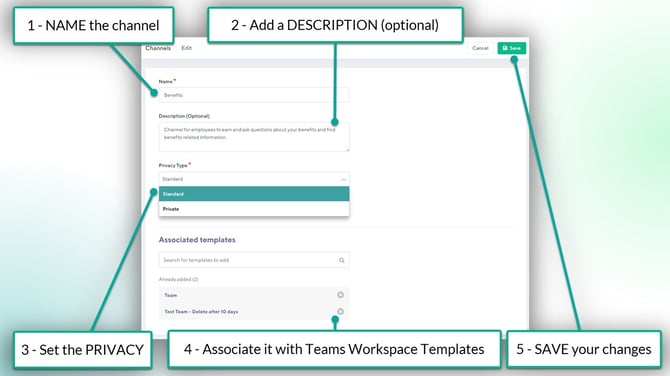
From the CHANNELS page, click the 'New Channel' button:- NAME the channel
- Add a DESCRIPTION (optional)
- Assigned a PRIVACY TYPE (Standard or Private)
- Associate to any existing Teams workspace (optional)
How to Associate Channels to Workspace Templates
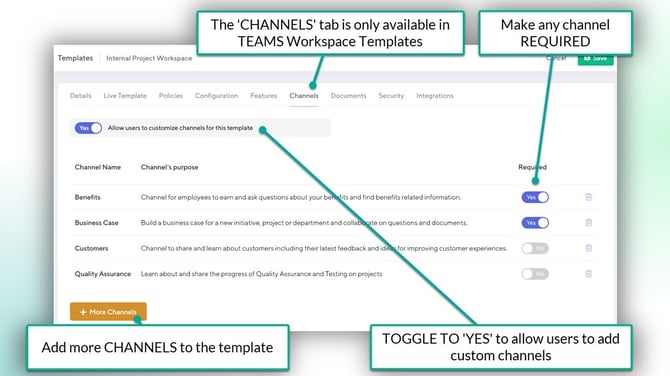
Method 1: Associate to Template from Workspace Template
The 'Channels' tab in Teams workspace templates is the most popular way to associate channels out of the three methods listed here.
From here, you can configure which channels are required vs suggested. You can also enable users to add their own channels during the request.
Method 2: Associate to Templates from Channels Page
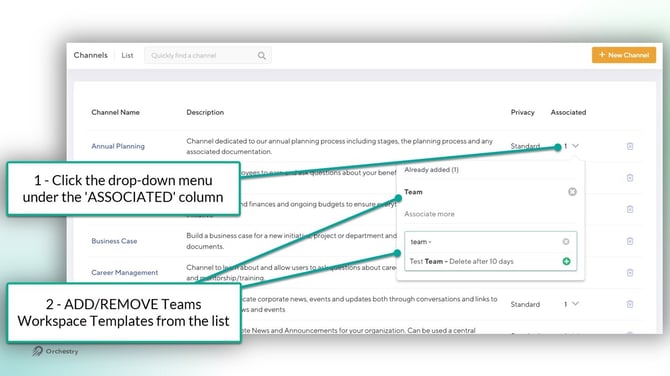
You can quickly associate channels to templates from the CHANNELS page by clicking the dropdown menu under the ASSOCIATED column. Channels will be added as "Suggested" only.
Method 3: Associate to templates from Specific Channel
When creating or modifying a channel, you can associate it with any template. Channels will be added as "Suggested" only.
Questions & Answers
Can Orchestry Admins or End Users customize channels with apps, tabs, etc?
No, not at this time. To provision workspaces with customized channels, consider using the 'LIVE TEMPLATE' feature in your workspace templates.
Can end users customize PRIVATE CHANNEL members during the request?
No, not at this time. Only workspace owners (including the requestor) are added to private channels during provisioning.
Are Shared Channels Supported?
No, not at this time.