
Blocked words provides the ability for you to set any words that should not be allowed as a workspace name.
Configuration
To configure blocked words, first navigate to Settings > Blocked Words on the Orchestry admin site.
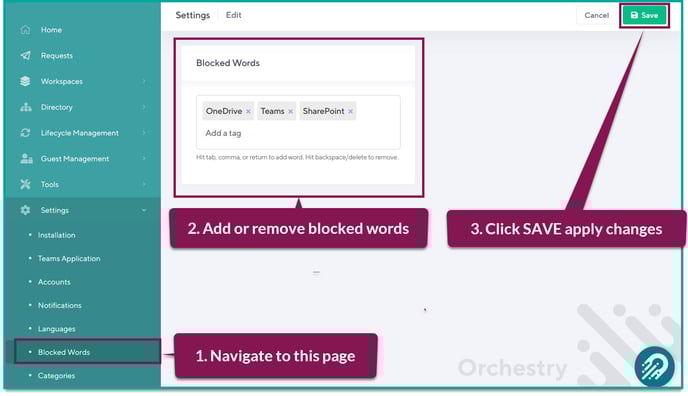
From this page, you can add or delete blocked words directly to the field shown.
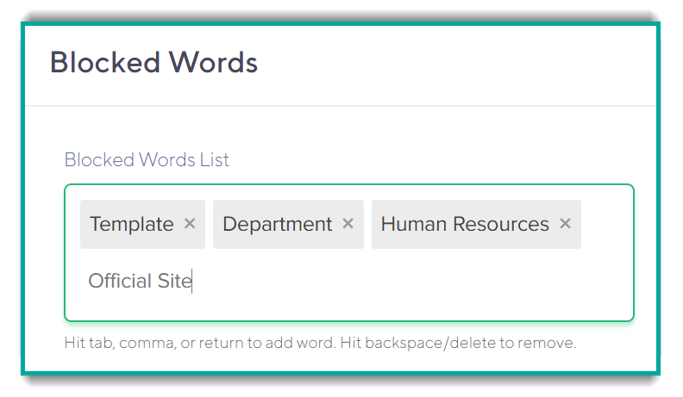
To add a new blocked word:
- type in the word (they can contain spaces) and
- hit the 'Tab', 'Comma' OR 'Return' keys to add the word.
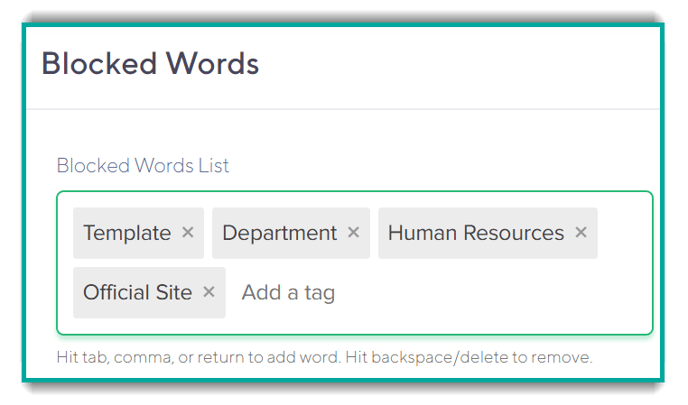
You will know that the word has been added when its represented as a tag in the Blocked Words list.
Once you have added your words to the list, click 'Save' on the top right to save any changes.
End User Experience
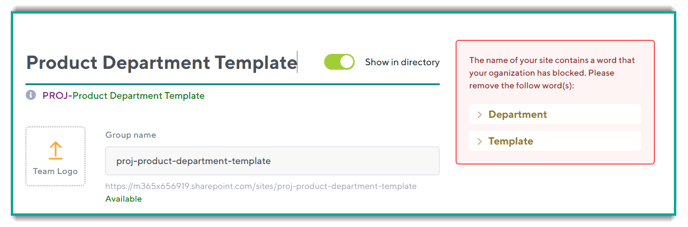
Blocked words are surfaced to users in the 'Details' screen of the workspace request wizard.
If a user attempts to enter a word from the 'Blocked Words' list as a workspace name, they will be notified and will not be able to continue:
Blocked Words Examples
Below are some examples of Blocked Words:
| Department Names: | You might want to limit the use of department names in your organization if not approved by each of the depart |
| Acronyms: | Having acronyms in workspace names might be an issue for new users in the organization. Having them in the 'Blocked Words' list can stop users for entering them as a workspace name. |
| Official Sounding Words: | Words such as 'Template', 'Organizational', 'Authoritative' as sometimes used in workspace names but this can be deceptive to end users as the workspace might not be officially sanctioned. |
| Words that are Part of a Naming Convention: |
Since you can control the name of a workspace using the Orchestry Naming Convention feature, you might want to stop users from entering that as a workspace name. For example, if you have PROJ as part of a naming convention, you might add that to the 'Blocked Words' list so that users don't accidentally enter it in twice. |